









How to Secure Your Email Server on an SMB Budget
You don’t have to be rich to secure your email server. Learn how to keep out the bad guys and safeguard your email communications in 10 steps without spending a fortune.
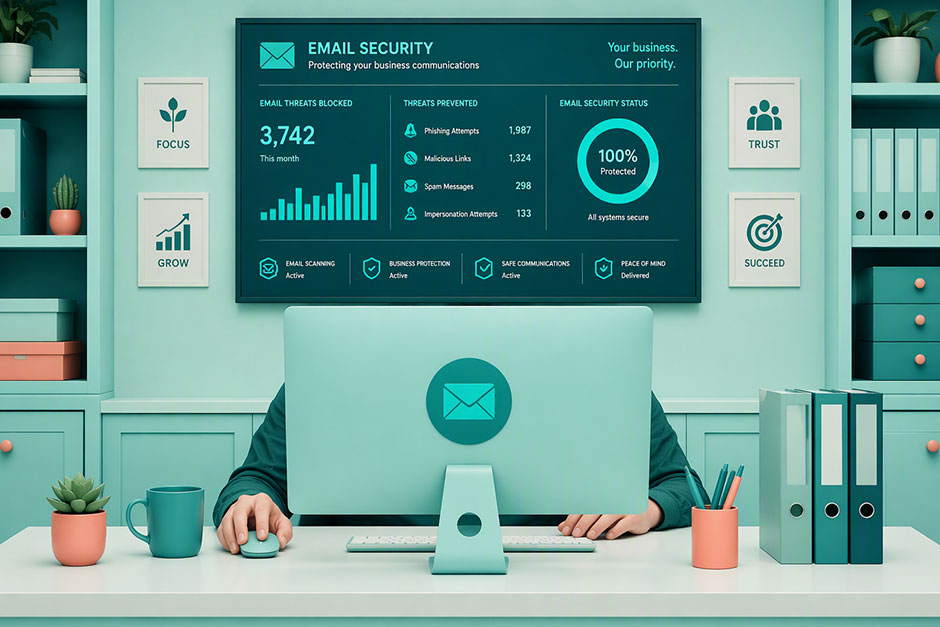
Having a secure email server is invaluable. Email allows small and large businesses to engage with customers and exchange business information with colleagues and teams around the world. However, its usefulness and reach also make it a primary target for cybercriminals.
The Hornetsecurity 2025 Cybersecurity Report revealed a staggering surge in malware email attacks (131% year-over-year). Additionally, there was a 34.7% increase in email scams and a 21% rise in phishing attacks.
Don’t risk your sensitive information falling into the wrong hands or compromising your customers, business, or your reputation. Your journey to secure your email server in 10 easy steps without breaking the bank starts now.
Don't make the same mistakes
Yahoo, Equifax, Home Depot,
LinkedIn, and Ericsson did!
Get our free 15-point checklist and
avoid the same costly pitfalls.
Contact details collected on InfoSec Insights may be used to send you requested information, blog update notices, and for marketing purposes. Learn more...
Secure Your Email Server in 10 Steps Without Breaking the Bank
At the end of January 2026, the Warlock ransomware group compromised 12 Windows servers and a secondary data center owned by SmarterTools, an IT management software company.
The cybercriminals leveraged a forgotten (i.e., unpatched) instance of the company’s SmarterMail email server to move laterally and infiltrate the Windows servers in the data center. The breach put all SmarterMail customers at risk of ransomware.
For small businesses, the stakes are high. The financial fallout from an incident can be devastating. But fear not. Making your email server more secure on a budget is possible, and it’s something you can do within your own organization. Here’s how, using many methods that cost little to nothing but your time and energy to implement. (And the money you save can be invested in the items that do have higher costs.)
| Steps for a Secure Email Server | Tips |
| #1. Replace Default Configurations & Check for Drift | – Enable and configure built-in protections – Create a zero-trust policy – Enable and configure filters – Disable unnecessary services – Get a dedicated IP address – Limit port 25 usage – Throttle the number of connections – Activate reverse DNS lookup – Follow industry best practices – Keep P2 FROM Header Manipulation Detection – Periodically check for configuration drifts |
| #2. Employ Authentication Protocols & Technologies | – Implement PKI-based authentication – Deploy SPF, DKIM, and DMARC |
| #3. Protect Your Credentials with Strong Access Controls | – Enforce non-SMS multifactor authentication (MFA) – Use least privilege access – Utilize SSH – Use an HSM/secure device (e.g., cloud-based) for storing keys and other credentials |
| #4. Embrace End-to-End Encryption (and Enforce It) | – Enable TLS for data in transit – Automate your certificate management process – Implement MTA-STS |
| #5. Opt for Secure Ports and Protocols | – Utilize secure ports and avoid open relays – Pick the right email protocol |
| #6. Invest in Email Server Firewalls and Blocklists | – Boost your outbound filtering – Use advanced spam filters – Regularly update the firewalls’ policies – Use access control lists (ACLs) – Utilize DNSBL and SURBL |
| #7. Patch and Update Your Email Server | – Keep your server’s software and configurations up to date – Establish a regular patching routine – Stay informed about the latest vulnerabilities and patches |
| #8. Establish Proactive Monitoring & Threat Detection | – Log and analyze email server activities – Leverage AI-based threat detection tools – Set up automated alerts |
| #9. Empower Your Teams With Training | – Run phishing simulations – Talk about email security best practices – Test your employees |
| #10. Test Your Email Server’s Security & Recovery Capabilities | – Run penetration tests – Review access policies and security settings – Backup your emails |
#1. Replace Default Configurations and Check for Drift
We get it: When you have limited resources and skills, sticking to your server’s default configurations can save you time and money, but only in the short term. This insecure approach will inevitably cost you more in the long run, considering that security misconfiguration is the second most critical security risk in the OWASP’s 2025 Top 10.
Cybercriminals know these settings like the back of their hand and will exploit them to breach your network. So, let’s start with some essential dos and don’ts for configuring your secure email server correctly.
- Enable and configure your secure email server’s built-in protections. Do you use an Exchange email server? Cover all components involved in sending and receiving emails, including your email clients. For instance, the National Security Agency (NSA) and Cybersecurity and Infrastructure Security Agency (CISA)’s Microsoft Exchange Server Security Best Practices guide suggests activating Microsoft Defender Antivirus and Attack Surface Reduction (ASR) rules. They’re designed to protect you from malicious scripts, web shells, and payloads.
- Create a zero-trust policy for Windows App Control for Business/AppLocker. It’ll enable you to deny the execution of unapproved files, scripts, and code by default.
- Enable and configure Exchange’s anti-spam and anti-malware filters. They’ll keep spam and malware away from your users’ inboxes, preventing potential breaches and data loss.
- Disable your email server’s unnecessary services. It’ll dramatically reduce your server’s attack surface. Turn off legacy or unused services as well as basic authentication on all Exchange virtual directories.
- Get a dedicated IP address for your mail server. Device traffic and email traffic shouldn’t share the same IP address. If a device gets infected with malware, your email server may be blacklisted. This will result in email providers rejecting your messages.
- Limit outbound port 25 usage. Set a firewall rule that permits only Simple Mail Transfer Protocol (SMTP) servers to use this port. Why? Because when port 25 is open, this relay can be used by virtually anyone. This means any unauthenticated (and likely unauthorized) user, including threat actors, can connect to your mail server and send emails.
- Throttle the number of possible connections to your email server. Regulate how many emails can be sent per domain, IP address, or sender. Microsoft does it automatically for Exchange Online. However, if you have on-premises Exchange servers, you must implement the message limits and throttling options available for your server type. Limit the number of concurrent connections per session or endpoint to fend off distributed denial-of-service (DDOS) attacks, spam, and phishing attacks.
- Activate reverse DNS lookup. Domain name system (DNS) records play a critical role in ensuring your emails reach the right recipients securely and reliably. Enable reverse DNS Lookup to stop fraudulent senders. Once done, if the sender’s IP address doesn’t match both the host and domain names in the SMTP EHLO (modern)/HELO (legacy) command, the email is blocked.
- Follow the new National Institute of Standards and Technology (NIST)’s DNS security guidance. These best practices help you minimize the likelihood of attackers exploiting DNS weaknesses for data exfiltration, spam, phishing, and ransomware campaigns.
- Don’t disable the default P2 FROM Header Manipulation Detection. This verification feature empowers Exchange servers to automatically detect email spoofing that bypasses SPF, DKIM, and DMARC verifications (more on that momentarily). Enabled by default starting with Exchange Server November 2024 Security Update (SU), the P2 FROM Header Manipulation Detection setting flags the email as phishing and inserts an information log in the email’s header (e.g., X-MS-ExchangeP2FromRegexMatch).
- Check for configuration drifts. Stay in control of your servers’ configurations by periodically verifying them. You can do it automatically using open source tools such as Puppet or Chef. These tools will identify, monitor, and remediate configuration drift for you in real-time.
#2. Employ Authentication Protocols and Technologies
- Implement public key infrastructure (PKI)-based authentication for all emails and email servers. Opt for secure/multipurpose internet mail extensions (S/MIME) or OpenPGP. Get a valid email signing certificate and watch PKI work its magic. It’ll bind your digital identity to the message to guarantee your customers and colleagues that you’re the sender, nobody else.
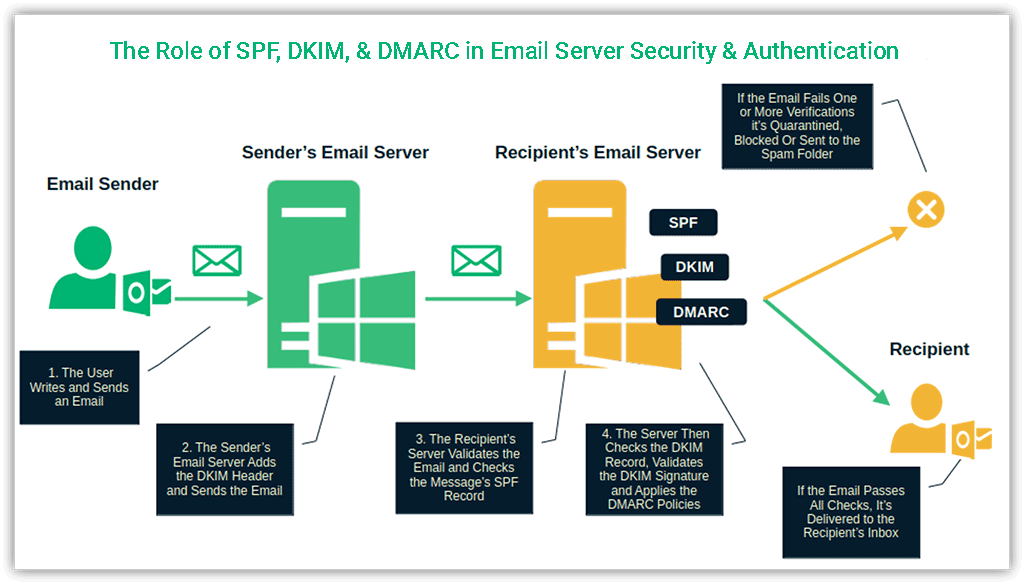
- Deploy email authentication SPF, DKIM, and DMARC.
- Sender Policy Framework (SPF) validates emails sent from your domain.
- DomainKeys Identified Mail (DKIM) proves the authenticity and integrity of messages sent from your domain by adding your digital signature to the email headers.
- Domain-based message authentication, reporting, and conformance (DMARC) finishes the job by ensuring that only authorized users can send emails utilizing your domain. It’ll be like having a bouncer at your secure email server’s door.
#3. Protect Your Credentials with Strong Access Controls
From the beginning of 2025 to mid-March 2026, Proton discovered over 902 million stolen sensitive data records. Passwords represented 47% of the exposed data. To secure your email server:
- Enforce multifactor authentication (MFA). A recent Microsoft report found that this solution could slash the risk of compromise by 99.2%. So, enable MFA (ideally, PKI-based authentication for companies with private PKI), but don’t use SMS as a second authentication factor. Even better, go passwordless if/when you can. Attackers are learning to bypass traditional MFA by harvesting active session tokens (e.g., LummaC2 infostealer).
- Use least privilege access. Don’t overdo with access permissions. Customers and service accounts don’t need admin access on your email server. Apply role-based access control (RBAC) for users and devices. This approach minimizes damage in the event of a breach.
- Transition to passwordless Secure Shell (SSH) protocol for server admin access. Do your server admins already use SSH to manage your secure email servers through an encrypted connection? Good, but you can do better. Swap traditional usernames and passwords for cryptographic key pairs. This authentication method, when paired with SSH key management best practices, leaves the bad guys with nothing to steal.
#4. Embrace End-to-End Encryption (and Enforce It)
What would happen if you sent your boss the latest updates about a confidential project printed on a postcard? Anybody could read it, including competitors. The same concept applies to emails in transit. If you don’t use a secure connection, anyone lurking in the digital shadows could intercept, read, or modify the message. To prevent this issue:
- Enable transport layer security (TLS) to secure client and server data in transit. A secure email server is never secure enough. Add an SSL/TLS certificate from a reputable certificate authority or vendor (e.g., SectigoStore.com) to your email server. Quickly check that it’s properly installed with Microsoft TLS Configuration Check, and you’re ready to go. From now on, no one will be able to intercept and/or modify the messages in transit between the client and your secure email server.
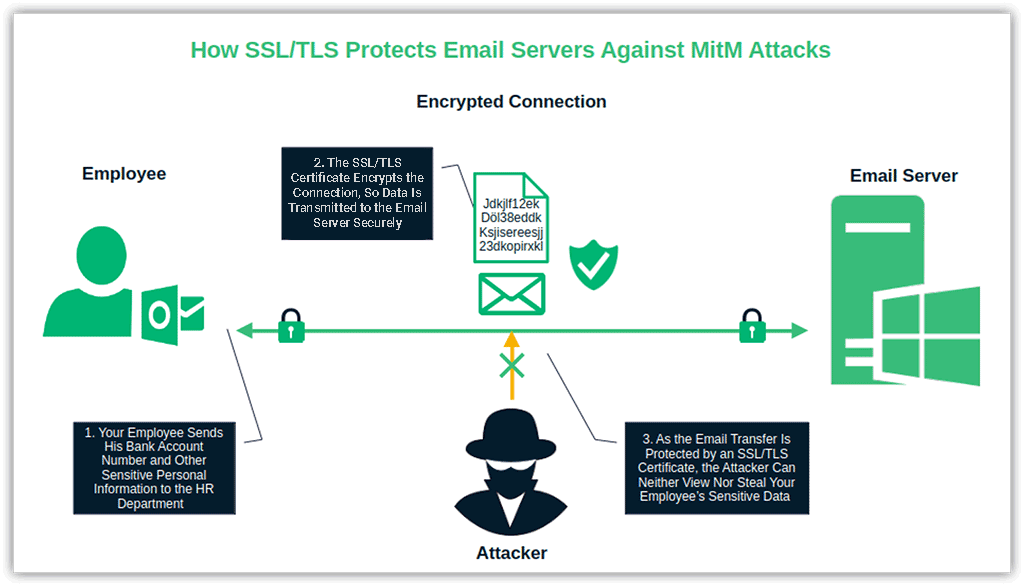
- Automate your certificate management process. As of March 15, the lifespans of publicly trusted SSL/TLS certificates were reduced to a maximum of 200 days. Their lifespans will further be reduced up until March 15, 2029, when they will ultimately be capped at 47 days. Keep risky exposures due to expired certificates at bay with solutions like Sectigo’s ACME Certificate-as-a-Service (CaaS). It’s a certificate automation software designed specifically for SMBs on a budget.
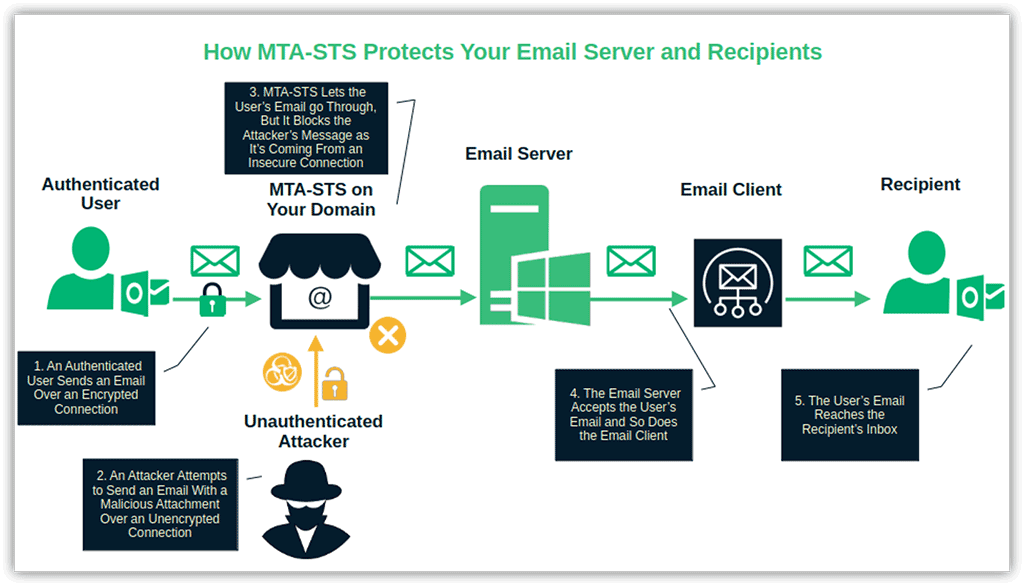
- Implement mail transfer agent strict transport security (MTA-STS). Don’t be intimidated by the long, somewhat pompous name. In a nutshell, MTA-STS allows only inbound emails sent through a secure connection (i.e., TLS 1.2 or TLS 1.3). When an attacker sends you a message with a malware-infected attachment over an insecure connection (e.g., unencrypted), MTS-STS will jump in and promptly reject it before it reaches your inbox.
#5. Opt for Secure Ports and Protocols Only
In January 2025, the Shadowserver Foundation identified over 3 million Internet Message Access Protocol (IMAP) and Post Office Protocol (POP) 3 email servers without SSL/TLS encryption enabled. As usernames and passwords were transmitted in clear text, all servers were vulnerable to network sniffing attacks.
To ensure your users can securely check and send emails without the need for a browser, protect the connection with an SSL/TLS certificate, and:
- Utilize IMAP and POP3 for inbound emails only through their secure ports. For instance, use only the secure port 993 for IMAP. Would you rather use POP3? Open port 995.
- Apply the same rule to your outbound emails and avoid open relays. Open port 587 or, if it’s blocked, use port 2525. Be sure to enable STARTTLS and configure your SMTP accordingly. This measure restricts sending emails from domains other than your own or specific IP addresses.
- Pick the right protocol. If you select POP3, be aware that downloaded emails will be automatically deleted from the server. This could pose an issue for forensic analysis or compliance with information retention policies required by regulations such as GDPR. So, choose wisely.
#6. Invest in Email Server Firewalls and Blocklists
Verizon’s 2026 Data Breach Investigations Report (DBIR) revealed email as the top vector in 98% of social engineering-related data breaches analyzed. Protect your organization, users, and customers by investing in firewalls and blocklists.
- Boost your outbound filtering. Regulate how many emails can be sent from your domain within a specific timeframe (i.e., outbound traffic rate limits) and set size restrictions for attachments and messages. This approach safeguards your domain’s reputation, minimizes the risk of blocklisting, and limits the number of spam or phishing emails sent by compromised accounts.
- Use advanced spam filters. Artificial intelligence can do more than create funny videos or pictures. AI-based spam filters such as Rspamd (free and open-source) or Proofpoint Essential (paid) leverage machine learning (ML) to enhance accuracy and cut down false positives. Pair them with traditional spam and malware filtering for maximum effectiveness.
- Regularly update your firewalls’ policies. Firewalls shield your network against cyberattacks. They control access, monitor your network activity, and enforce security policies using allow and block rules. However, threat actors improve their tactics fast. Refine your rules regularly and adapt them to protect you from new threats.
- Use access control lists (ACLs). These lists allow you to regulate your email traffic through specific rules. For example, you could create a rule that allows only inbound and outbound authorized email traffic. Or generate one that blocks all inbound and outbound emails, including executable attachments.
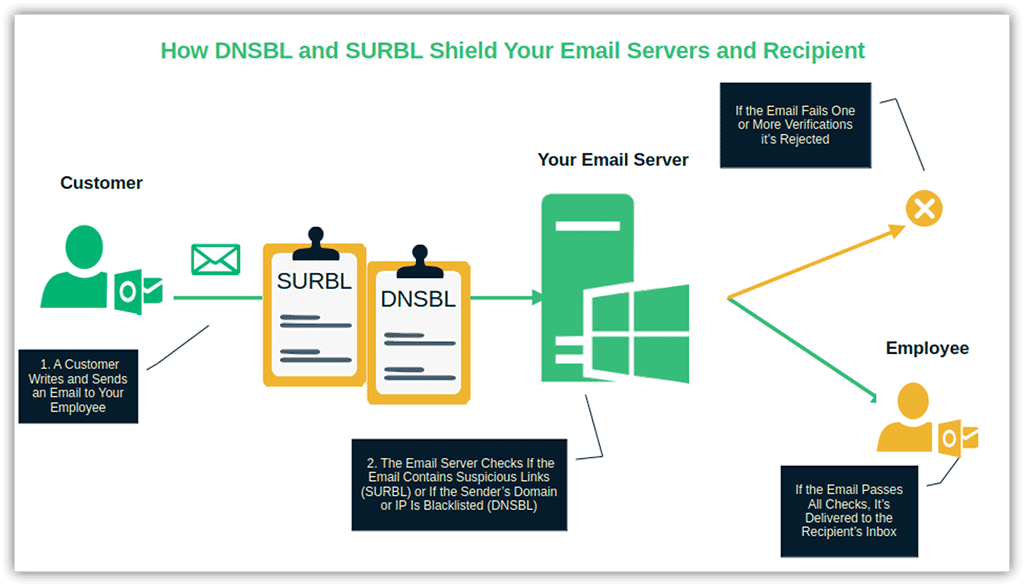
- Utilize Domain Name System Blocklists (DNSBL) and Spam URI Real-Time Block Lists (SURBL). DNSBL lists automatically verify the sender’s domain or IP against reputed blocklists maintained by providers such as Spamhaus. Emails from the listed IP addresses are rejected automatically. Implement SURBLs so that all emails containing invalid or suspicious links are refused, too.
#7. Patch & Update Your Email Server
Secure your email server through regular patching and updates. A report published by the Forum of Incident Response and Security Teams (FIRST) Inc. estimates that in 2026, roughly 56,000 new vulnerabilities will be discovered. While not all of these will impact email servers, keeping your system up to date and patched is non-negotiable.
- Keep your server’s software and configurations up to date. Deploy security updates regularly. Test them first, but don’t wait for too long. In March 2026, attackers exploited a vulnerability 20 hours after it was announced. They snatched private keys and credentials, leaving the organization vulnerable to a supply chain compromise.
- Establish a patching routine. Identify vulnerabilities, check for newly released patches, test them on a few machines, and… repeat. Using gradual (staged) rollouts (ideally, the full five phases) to test patches/updates will minimize the risk of issues when you start a widespread deployment. Opt for automated network and web application vulnerability scanning tools.
- Stay informed about the latest vulnerabilities and patches. Sign up for the Cybersecurity and Infrastructure Security Agency (CISA) newsletter. If your secure email server is based on Exchange, follow the Exchange blog and join the Microsoft Tech Community Hub.
#8. Establish Proactive Monitoring and Threat Detection
In 2025, Microsoft identified and blocked 35.7 billion phishing and malicious emails across Microsoft 365 and Outlook.com. That’s an average of nearly 98 million messages per day. But the digital world is filled with lurking threats, such as password spraying, snooping, and man-in-the-middle attacks. So, how can you bolster your secure email server defenses?
- Log and analyze email server activities. Log everything and store the data in platforms like Elasticsearch or Wazuh. It’ll turn raw data into clear insights, making it easier to visualize potential issues in real-time and investigate breaches.
- Leverage AI-based threat detection tools. Here’s another jolly good way to tap into the power of AI: set up real-time monitoring. It’ll empower you to spot (and address) suspicious activities before they escalate.
- Set up automated alerts. Ensure your security team is automatically notified about key email server security events, such as failed login attempts or unauthorized configuration changes.
#9. Empower Your Teams with Training
According to Verizon’s 2026 DBIR, 62% of breaches involved the notorious “human element.” Make your secure email server even more secure by building a culture of cybersecurity awareness throughout your business.
- Run phishing simulations. Let your users experience phishing firsthand. For instance, the Google phishing quiz is an engaging and fun way to help them better retain what they’ve learned. Looking for something more sophisticated? Check Microsoft Defender’s attack simulation feature.
- Talk about email security best practices. Teach your users how to keep their accounts secure, recognize real-world threats, and sign and encrypt their messages with trusted email certificates. Share juicy insights from cybersecurity experts.
- Put your employees to the test. Spice things up with cybersecurity contests. Take on the role of a white-hat social engineer to verify how well your staff guards sensitive information (e.g., credentials).
#10. Test Your Email Server’s Security & Recovery Capabilities
One out of five small businesses polled by VikingCloud in 2025 admitted that a successful cyberattack worth $10,000 in damages would knock them out of the game. Testing your secure email server and creating a disaster recovery plan may cost you some dough, but at least it may keep you afloat.
- Run penetration tests. Play the role of the bad guy. Check the effectiveness of your firewalls, filter rules, email authentication, and server configurations through simulated attacks.
- Review access policies and security settings. Prevent misconfigurations and mistakes by running a secure email server health check. Review access policies every quarter. While you’re at it, test your business continuity and disaster recovery processes, too.
- Backup your emails. You don’t need a cybersecurity incident to lose your email messages forever. Your secure email server/emails might get corrupted. An employee might hit the delete button by mistake. Be prepared. Set up a frequent automated email backup and protect it with encryption.
Final Thoughts About Email Server Security for SMBs
A secure email server isn’t just a nice-to-have perk. It’s a must-have that protects your business and customers from costly and often devastating cybersecurity incidents (e.g., data breaches, ransomware, and malware infections).
It helps you ensure compliance with data privacy and security regulations (e.g., GDPR, PCI-DSS, and HIPAA), avoid hefty fines, and prevent damage to your brand’s reputation. So, this year, do the right thing for your business and customers by operating a secure email server:
- Harness the power of encryption with SSL/TLS certificates. (Don’t forget to manage them automatically with Sectigo’s ACME CaaS.)
- Shield your company against phishing and email scams with PKI authentication.
- Implement DMARC, SPF, and DKIM.
- Establish a regular patching routine.
Did you tackle all nine steps mentioned in the article? Well done. Become a secure email server superstar. Follow baseline configuration frameworks such as the Defense Information Systems Agency (DISA) Security Technical Implementation Guide or the Center for Internet Security (CIS) Benchmark.

Manage Certificates Like a Pro
15 Certificate Lifecycle Management Best Practices to keep your organization running, secure and fully-compliant.
Contact details collected on InfoSec Insights may be used to send you requested information, blog update notices, and for marketing purposes. Learn more...



2018 Top 100 Ecommerce Retailers Benchmark Study
in Web Security5 Ridiculous (But Real) Reasons IoT Security is Critical
in IoTComodo CA is now Sectigo: FAQs
in SectigoStore8 Crucial Tips To Secure Your WordPress Website
in WordPress SecurityWhat is Always on SSL (AOSSL) and Why Do All Websites Need It?
in Encryption Web SecurityHow to Install SSL Certificates on WordPress: The Ultimate Migration Guide
in Encryption Web Security WordPress SecurityThe 7 Biggest Data Breaches of All Time
in Web SecurityHashing vs Encryption — The Big Players of the Cyber Security World
in EncryptionHow to Tell If a Website is Legit in 10 Easy Steps
in Web SecurityWhat Is OWASP? What Are the OWASP Top 10 Vulnerabilities?
in Web Security