




loading image

Code Signing Certificates

Start building trust with signed software. From an .exe to firmware in a car, a
Sectigo Code Signing certificate proves that software is yours and hasn't been altered.

Supported on 99.9% of browsers, iPhones & mobile devices — Firefox, Chrome, Internet Explorer, Opera, Safari logos.

What is Code Signing?

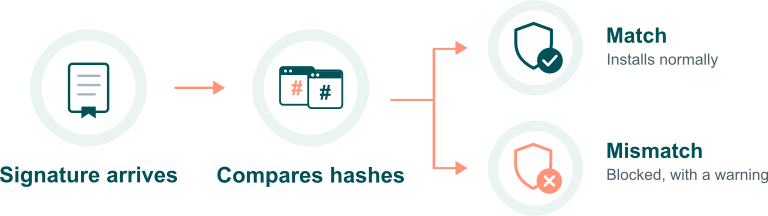
Someone downloads your signed software. (Yay.) Two things happen before it runs. The operating system checks the signature to confirm it really came from you, and that the file hasn’t been altered.

A code signing certificate adds an authenticated and verifiable digital identity to every piece of code before deployment. Think: containers, software applications, drivers, firmware, etc. This provides a way for customers and systems to verify whether your software apps, code, and other signed products have been tampered with after distribution.

Why do You Need a Code Signing Certificate?

Why do You Need a Code Signing Certificate?

  • Some platforms won’t run unsigned software.

    macOS currently blocks unnotarized apps distributed outside the App Store with Gatekeeper. 64-bit Windows won’t load an unsigned kernel-mode driver at all.

  • EV code signing is required for Windows driver signing.

    EV Code Signing certificates are required for accessing the Windows Hardware Developer Centre Dashboard Portal, through which all kernel-mode drivers targeting Windows 10 must be signed.

  • Adds another layer of security to software.

    Code signing adds another verification layer to app, device, and firmware security. That protection reaches past desktop software. Consider medical devices, industrial equipment, and firmware running inside newer vehicles.

  • Secures your software supply chain.

    Extends protection Helps to secure your software development life cycle (SDLC) tools and the software supply chain (including the CI/CD pipeline) against compromise.

  • New regulatory and compliance expectations are in effect.

    Meet federal, geographic, and industry-specific code signing requirements, including U.S. EO 14028, the EU Cyber Resilience Act, and ISO/SAE 21434.
How Does Code Signing Work?

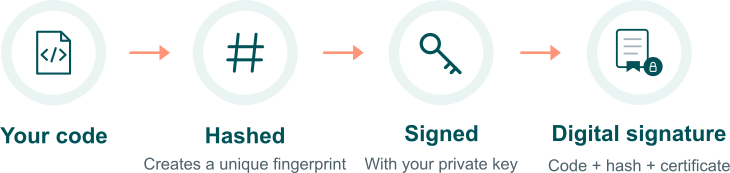
A digital signature is generated from your code and signed with your private key. Since June 2023, the key must live on a secure USB token or HSM, not as an exportable file (more on that below.)

Basically, the file gets a unique fingerprint that your private key signs.

That signature travels with the file and your certificate. When someone downloads the software, their system checks the file again and compares the new hash to the signed one. If they match, the file hasn’t been changed.

How does Code Signing work?

This all comes down to hashing. An algorithm like SHA-256 creates a unique fingerprint for a file. The fingerprint stays the same as long as the file stays the same, but even the smallest change produces a different one.

Now there’s proof of who made it and proof that it hasn’t been altered. Code signing delivers on both.

Code signing delivers on both

Code Signing Changes You Should Know About

What Can I Sign With a Code Signing Certificate?

What Sectigo certificates cover today:

  • Microsoft Authenticode — .exe, .dll, .msi, .cab, .ocx (Windows 7 through 11; kernel-mode driver signing requires EV — see EV card)
  • MSIX packages — required for enterprise/sideload distribution outside the Microsoft Store (Store submissions are re-signed by Microsoft automatically, so no cert is needed for that path specifically)
  • ClickOnce deployment manifests (Visual Studio) — must be an Authenticode-valid cert; self-signed test certs aren't accepted
  • NuGet packages and VSIX (Visual Studio extension) packages
  • Java — .jar files
  • Microsoft Office VBA and Office macros
  • PowerShell scripts and .NET assemblies
Why Sectigo

Why Choose Us?

- We Offer the Most Trusted Brands

- Streamlined SSL Support (24 Hours/7 Days/365 Year)

- Excellent SSL Experts

- Unlimited SSL Tools

- A 30 Day Money Back Guarantee

  • Firefox web browser image
  • Google Chrome web browser image
  • Internet Explorer web browser image
  • Opera web brower image
  • Safari web browser image

Our certs are supported on 99.9% of web browsers, iPhones & mobile devices

Our Awesome Customers