










From the Edge to the Core: 9 Ways PKI Secures Your Network
Explore public key infrastructure (PKI) use cases for securing sensitive network resources against external and internal threats from unauthenticated users
What’s the first thing that comes to your mind when I say “PKI”? I bet it’s secure sockets layer/transport layer security (SSL/TLS) website certificates, where PKI secures the hypertext transfer protocol secure (HTTPS)-encrypted communications between two parties (e.g., a client and a web server).
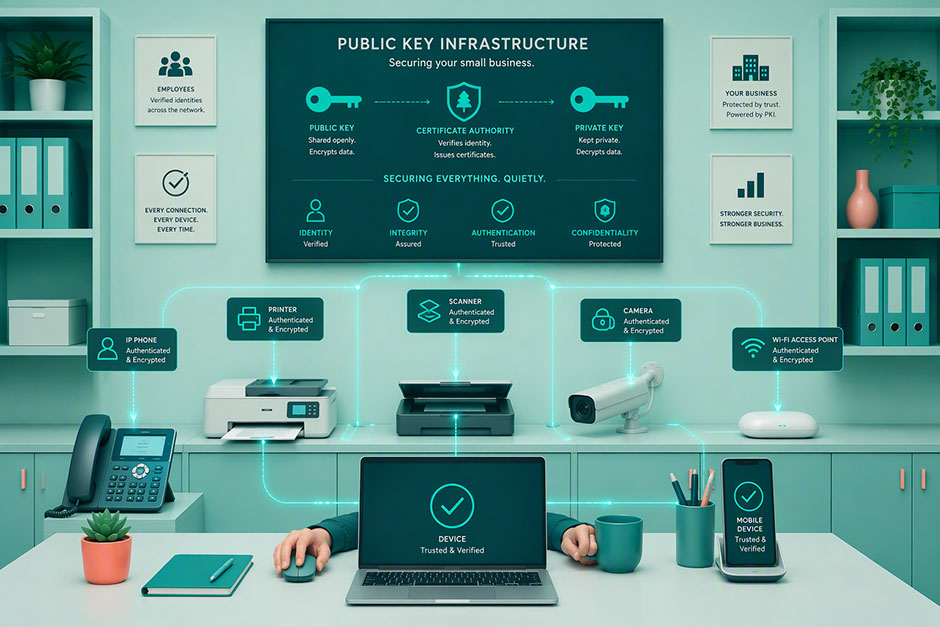
But public key infrastructure (PKI) in networking is much more than that, especially in an environment where every connection counts, and threats lurk in every corner. Join us on a journey of a typical day at the office to uncover 9 ways PKI in networking secures different aspects of your business, from the edge to the core of your network and integral systems.
PKI in Networking: 9 Ways PKI Secures Every Layer of Your Network
There was a time when network security relied on perimeter defenses, such as firewalls and virtual private networks (VPNs). However, with the rise of remote work, IoT, and cloud computing, those tools alone are no longer enough.
Don't make the same mistakes
Yahoo, Equifax, Home Depot,
LinkedIn, and Ericsson did!
Get our free 15-point checklist and
avoid the same costly pitfalls.
Contact details collected on InfoSec Insights may be used to send you requested information, blog update notices, and for marketing purposes. Learn more...
Enter PKI. It’s the behind-the-scenes framework that keeps your websites, network, systems, and data secure while promoting trust. This powerful solution is the bedrock of network security. By managing digital certificates and cryptographic key pairs (e.g., public and private keys), PKI in networking:
- authenticates humans, websites, and machines’ identities
- allows trusted connections
- safeguards the integrity, confidentiality, and authenticity of transmitted data
Explore real-world scenarios where public key infrastructure in networking protects your organization’s assets in a world where even your breakroom’s vending machines are connected to the internet.
1. PKI in Networking Secures Remote & Physical Access Within Your Organization
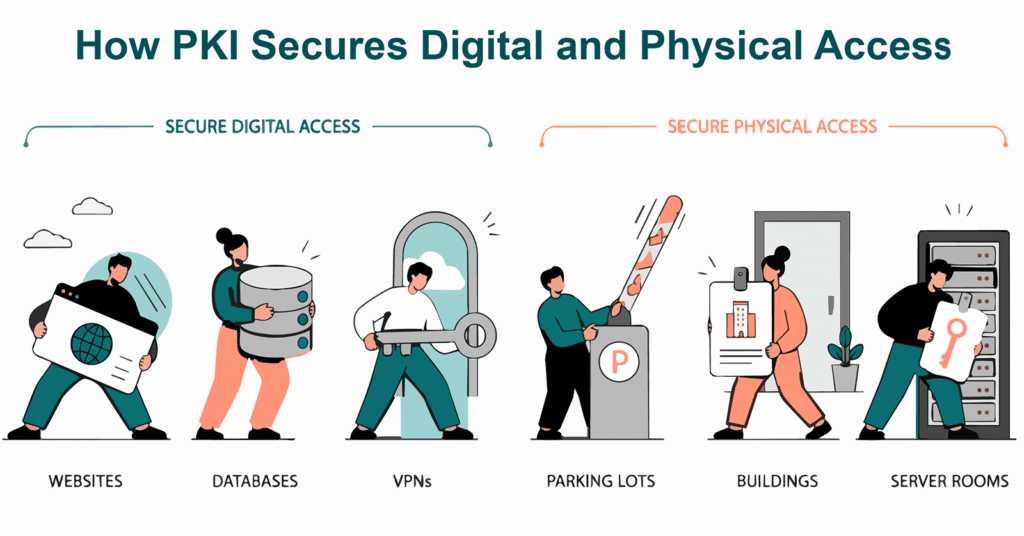
It’s the start of a new work week, and you’ve just left home. On the subway or train, you realize you need to access something on your company’s secure network and log on using its virtual private network (VPN). This isn’t a big deal from a security perspective, given that you have a PKI personal authentication certificate installed on your company smartphone.
Example #1: PKI Authentication Certificates Safeguard Your Remote Access to Your Company’s Network
This PKI-based unique authentication certificate provides you with secure access to your company’s VPN and, through it, many of its digital assets (file servers, internal websites, etc.). Implementing PKI-based VPN access allows your organization to control who or what can remotely access your systems.
Example #2: Safeguards Your Physical Access to Your Organization’s Secure Facilities
Imagine you’ve just arrived at your company’s building. Without issue, you take out your smart card or ID badge, scan it, and walk inside. Next, you head upstairs to go to your office.
Behind the scenes, PKI is at work to ensure that only the badge owner enters the premises.
- On one hand, PKI allows you to ensure your employees have access to the spaces they need — we’re talking about everything from parking places and the office building to highly secure server rooms and labs.
- On the other hand, it serves as a bouncer, keeping unauthorized and malicious third parties at bay from areas they shouldn’t access. This way, attackers won’t be able to enter your data center and move laterally into your network.
2. PKI in Networking Bolsters Authentication & Security Within Your On-Prem Wi-Fi and VoIP System
Now that you’ve reached your office, you switch on your laptop and connect to the company’s internal wireless network. You then log in to your voice-over-IP (VoIP) system to call one of your main clients. Guess what? PKI is at work here, too.
Example #1: Secure Wi-Fi Authentication
Certificate-based identity is a PKI authentication mechanism that lets you prove your identity without typing your credentials. In fact, during authentication, the private key never leaves your device’s trusted platform module. This protects you from password-stealing attacks such as man-in-the-middle or evil twin. Companies often have private certificate authorities (private CAs) set up that issue certificates for a variety of internal authentication use cases, including seamless wireless network access.
Example #2: Encrypted VoIP Communications
Do you have to discuss the latest updates about a confidential project with one of your main clients? You can do so without fear of eavesdroppers learning something they shouldn’t know.
- By leveraging public key cryptography and SSL/TLS certificates, PKI encrypts the session initiation protocol (SIP), ensuring that key call information (e.g., who is talking to whom, how long the call lasts) remains private. It also prevents attackers from re-routing your call to a fraudster by instantly interrupting the connection when it detects a tampering attempt.
- Pair it with the secure real-time transport protocol (SRTP), and you’ll protect your voice and data communications end to end.
3. PKI in Networking Uses Encryption and Authentication to Enhance Email Security and Integrity
Today, email remains the preferred communication method for most businesses. It’s fast, convenient, and cheap. But the reality is that your valuable email messages are also at risk of spoofing and unauthorized modifications while in transit. Fear not, though, as this is where PKI in networking really shines.
Example #1: Email Server Authentication
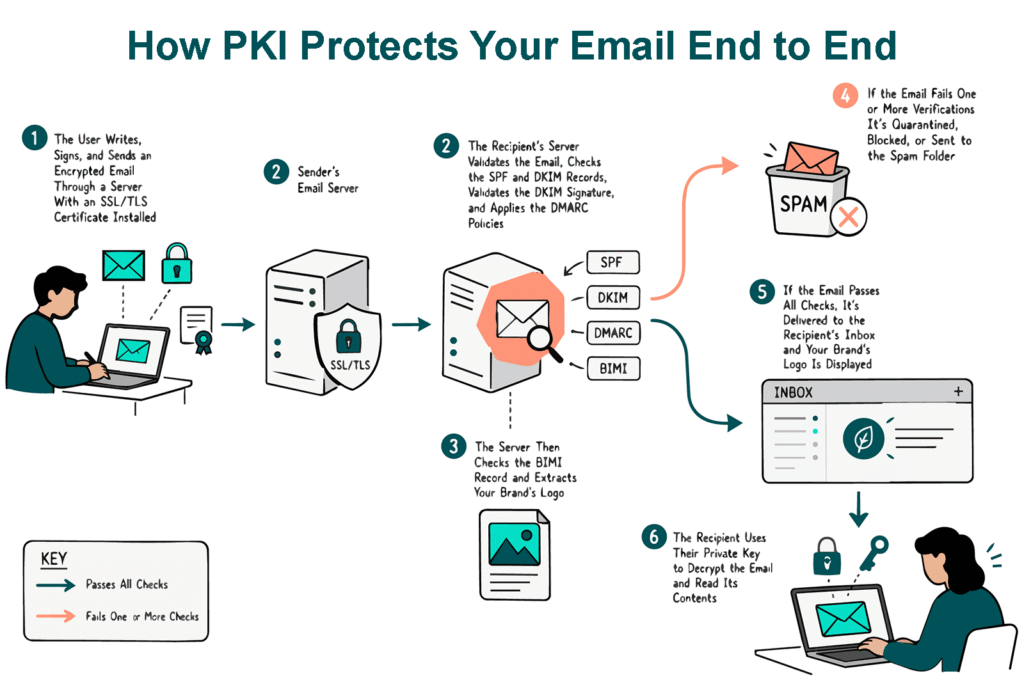
If you send newsletters or messages in bulk to Gmail users, then you likely already installed an SSL/TLS certificate on your email server. Why? Because Google has required TLS connections for bulk email senders since December 2023. You still haven’t installed one? Then now’s the time to do so. PKI allows you to authenticate your email server securely and exchange messages over encrypted connections. You couldn’t ask for more.
Example #2: Trustworthy Digital Signatures for Emails
When you have a secure/multipurpose internet mail extension (S/MIME) certificate installed in your email client, you can add your unique cryptographic digital signature to every message, which proves the message’s authenticity. Basically, that assures recipients that the message genuinely came from you and not an imposter.
Pro tip: Ensure you purchase a publicly trusted certificate and don’t use a self-signed certificate. This way, both your colleagues (internal recipients) and customers will be able to verify the legitimacy of your messages.
Example #3: Email Contents Encryption
PKI, when paired with S/MIME certificates, allows you to take things a step further by encrypting the emails themselves. This combination of email message encryption + the secure encryption channel provided by the aforementioned SSL/TLS certificate provides end-to-end encryption.
Let’s imagine that you need to send a secure email to your boss, which is possible because your company uses email signing certificates. Since you and your boss have previously exchanged digitally signed messages, you have his public key. So, when you send an email to your boss:
- The email message and other contents are encrypted using your boss’s public key before the message leaves your outbound mailbox.
- The email is transmitted using a secure, encrypted connection (via the email server’s SSL/TLS certificate).
- When your boss opens the email using a client with the certificate installed, the PKI process behind it automatically decrypts the message using the private key.
This means your message is secure both in transit and at rest in his inbox. Only he (as the private key holder) can open the message.
Example #4: Visibly Branded Messages
Think about when you last checked your email in Gmail, Yahoo Mail, Apple Mail, and several other major email providers: did you see messages from brands that displayed their logos up front, so they were visible before you even clicked on the email? That’s possible, in part, because of PKI and digital files known as mark certificates.
A common mark certificate (CMC) or a verified mark certificate (VMC), when combined with brand indicators for message identification (BIMI) and domain-based message authentication, reporting, and conformance (DMARC), lets you display your brand’s verified logo next to your message when it reaches your customers’ inboxes. This powerful feature assures recipients that those messages were sent by you and not an imposter.
The biggest difference between these two certificates is that a VMC has more stringent verification requirements (including a logo with a registered trademark) and displays a verified checkmark in Gmail and several other major email clients.
4. PKI in Networking Authenticates and Secures Your Edge and IoT Devices’ Communications
The day goes on and, suddenly, you remember that you still need to print a presentation for the project status meeting later that morning. It’s a critical project containing confidential data. So, when you hit the print button, is the data transmitted to the printer through an encrypted channel? Yes, but only if it’s protected by PKI.
Example #1: Robust Authentication and Encryption for Network Printers
How often do you update and patch your printers’ software? Like many, probably not very often. PKI’s encryption and robust authentication bolster the security of your network printers, protecting their data transmissions from snooping and data interception attacks by creating a secure channel.
While PKI might not be a cure-all, securing your organization’s printers with PKI certificates plays a key role in protecting your network and minimizing the impact if the worst happens.
Example #2: Secure Your Routers and IoT Devices
Did you know that routers are considered the most vulnerable IT devices, according to Forescout’s 2026 Riskiest Devices research? After a hurricane hit my area in 2026, I realized how important that little device sitting in the corner of your house or business is. Without a functioning router, you’re more or less back to the Stone Age.
- You can’t use your VoIP telephone.
- You’re unable to send or receive emails.
- If you have a business, you can’t accept card payments or access cloud platforms and services.
Obviously, nothing will help if there is no electricity. But the good news is that PKI can enhance the security of your router and IoT devices (e.g., smart cameras and POS systems) in other situations. All you need to do is leverage your personal device certificate and PKI’s robust authentication and device validation processes. This way, only legitimate (i.e., authenticated) devices can access your network.
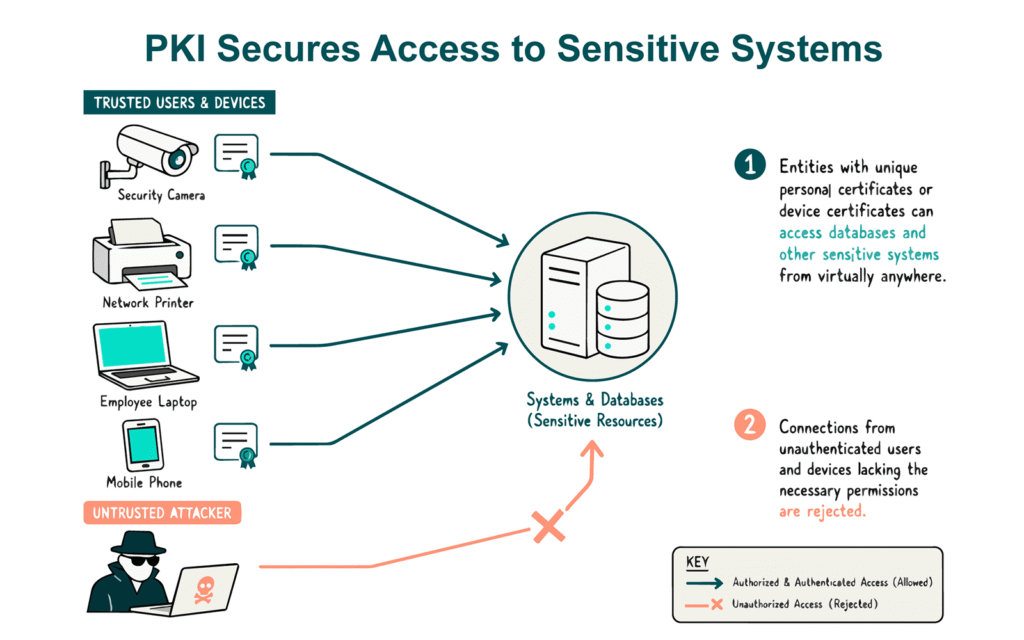
5. PKI in Networking Facilitates Secure Cloud Application Access and Enables Secure Communication
After lunch, you access the organization’s cloud-based project management software to add a list of new tasks, deadlines, and notes of the items discussed during the morning meeting. In this case, PKI helps you minimize the risks of data breaches, lateral movement, and snooping through robust authentication mechanisms.
Example #1: Secure Access to Cloud Apps
69% of organizations polled by Fortinet in 2026 experienced a cloud identity and access security incident in the past 12 months. PKI lets you implement robust security controls in your cloud environment, starting from authentication, by replacing weak passwords with secure, cryptography-based identities.
For instance, imagine an application programming interface (API) client asking the server to pull the current customer’s sensitive information from a database. PKI leverages trusted SSL/TLS certificates to verify that a system or a user is trusted and authorized to access the service.
Example #2: Authenticate and Encrypt Cloud Connections
Do you host some of your apps in the cloud? Then it’s essential to use mutual TLS (mTLS) to ensure both parties are authenticated —not just the server — and the connections between your containers and microservices are encrypted. This approach adds another layer of security to your network as a whole. Manage all those certificates swiftly through SSL automation tools.
6. PKI in Networking Helps DevOps Integrate Security Into the Software Development Lifecycle
Now that the project’s next steps are clear and agreed upon, it’s time to leave the next stage to your developers. Did you know that PKI in networking puts cybersecurity at the heart of your software development lifecycle? It secures everything from your software and scripts to your development and production processes — all the way through your supply chain.
Example #1: Code Signing (To Ensure Software Integrity)
When your developers sign their code with a trusted code signing certificate, PKI plays its role by creating a digital signature using their private key and a cryptographic function. Has your software been tampered with? When your code is signed with a code signing certificate, there’s a digital signature verification process (think checksum) that indicates to users when your software was altered after signing.
Example #2: Secure the SDLC Pipeline Itself
Beyond the resulting software applications, the pipeline tools themselves must be authenticated. The combination of code signing and mutual TLS (mTLS) in your CI/CD tooling (build servers, repositories, etc.) helps ensure the integrity of your build environment by allowing only authenticated systems to facilitate builds.
Example #3: Secure Microservices and Containers Communications
Securing Kubernetes clusters and containers isn’t always a walk in the park. PKI is a powerful ally here, too. You can leverage SSL/TLS certificates to allow microservices to mutually authenticate, ensuring that they communicate only with verified entities.
7. PKI in Networking Secures Your Web Applications, Public Websites, and Services
Back at your desk, while you go through a few reports, you notice a sudden decline in customer visits to one of your organization’s e-commerce pages. Concerned, you check the page and immediately spot the issue: the connection is insecure. PKI fixes this issue as well when you install a new SSL/TLS certificate on the server.
Example #1: Secure E-commerce Site Authentication and Encrypted Communication
When a customer visits your website, during the SSL/TLS handshake, your web server sends its SSL/TLS certificate to the client (e.g., your customer’s browser) to confirm its identity. If everything goes as planned, the connection is encrypted. Now your customers can purchase your goods and services and pay directly on your website. No more worries about malicious third parties stealing credit card details.
Example #2: Website Identity Validation
30 seconds. That’s how long it takes hackers to build a phishing site mimicking the login page of your web app. Do like the Federal Reserve: implement PKI and add an SSL/TLS certificate to the app with a high level of identity validation. It’ll enable your users to verify your identity and confirm that they’re accessing a legitimate application.
Pro tip: Choose an extended validation (EV) certificate. Compared to a standard organization validation (OV) certificate, it provides more detailed identity verification information about your business.
8. PKI in Networking Provides You Greater Visibility into Your Network Access
The insecure certificate might have been revoked; however, this doesn’t mean cybercriminals didn’t find a way to access your network. Therefore, your company’s IT security team decides to check all network access events. But how can they be sure that they didn’t miss something when 70% of businesses interviewed by Fortinet in 2025 consider visibility gaps their top issue?
Example #1. Authentication Events Logging
With PKI, all authentication events are logged. Thus, all the team has to do is analyze the logs. As digital certificates are device-bound, they will know exactly who, what, and when accessed the network through cryptographic authentication.
9. PKI in Networking Eliminates the Need For (and the Risks Related to) Traditional Passwords
That was a long day, but you’re finally on your way home. On the train, you check your email once more by connecting to your organization’s email platform through the VPN. But is it really secure, considering that in 2025, the Specops intelligence research team discovered 2,151,523 VPN passwords stolen from end-users?
Probably not, if you log in with a traditional username and password. (As all of your company’s phishing training simulations have taught you, a stolen or shared password can spell disaster.) All it takes is one moment of uncertainty to hand the keys to your company’s kingdom over to a hacker.
This is why your company decided to nix the risks associated with passwords altogether by using PKI certificates instead. Since there’s no username or password to remember or type in, unless a threat actor physically steals your device, access to your portal is safe and sound.
Example #1: Passwordless Authentication Eliminates a Common Attack Surface
Yup, you can use PKI to implement passwordless authentication for VPN, too. PKI in networking is so versatile that it lets you go passwordless wherever you want. Ensure you set it up correctly, though, as one small slip-up can be the difference between a secure connection and a man-in-the-middle attack.
Example #2 Passwordless Secure Shell (SSH)
SSH allows you to connect to your server securely by creating an encrypted connection between your computer and the server. However, the encrypted connection doesn’t protect the password you enter to access the service. Hey, PKI passwordless login works here, too. That’s a huge relief, given that researchers collected 18 million leaked credentials from 39 SSH and HTTP honeypots in just 12 months.
Final Words About How PKI Secures Every Layer of Your Network
PKI plays a crucial role in securing every layer of your network every day. From securing physical access to your infrastructure and systems to securing remote access and the communication channels that endpoint devices and servers communicate through, PKI takes your organization’s defenses to new heights.
Operating quietly in the background, PKI uses a combination of public key cryptography, digital certificates, keys, and signatures to forge a multi-layer protective shield over your organization. It helps you transition from the traditional “one-time trust” approach to a zero-trust model where trust and identity are continually verified. At the same time, it also ensures the confidentiality, integrity, and authenticity of data and code.
So, capitalize on the multiple benefits of PKI security in networking.
- select a trusted certificate authority or authorized reseller (e.g., SectigoStore.com),
- purchase your digital certificates, and
- implement PKI throughout your network and organization.
Don’t forget to automate your certificate management process, though. It’s an essential step since the lifespan of digital certificates is shortening dramatically.

Manage Certificates Like a Pro
15 Certificate Lifecycle Management Best Practices to keep your organization running, secure and fully-compliant.
Contact details collected on InfoSec Insights may be used to send you requested information, blog update notices, and for marketing purposes. Learn more...







2018 Top 100 Ecommerce Retailers Benchmark Study
in Web Security5 Ridiculous (But Real) Reasons IoT Security is Critical
in IoTComodo CA is now Sectigo: FAQs
in SectigoStore8 Crucial Tips To Secure Your WordPress Website
in WordPress SecurityWhat is Always on SSL (AOSSL) and Why Do All Websites Need It?
in Encryption Web SecurityHow to Install SSL Certificates on WordPress: The Ultimate Migration Guide
in Encryption Web Security WordPress SecurityThe 7 Biggest Data Breaches of All Time
in Web SecurityHashing vs Encryption — The Big Players of the Cyber Security World
in EncryptionHow to Tell If a Website is Legit in 10 Easy Steps
in Web SecurityWhat Is OWASP? What Are the OWASP Top 10 Vulnerabilities?
in Web Security