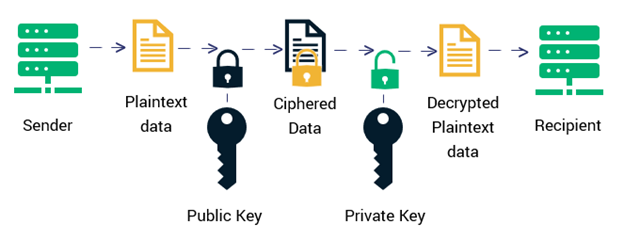


All posts by sectigostorepages

The 3 Best UCC SSL Certificates for 2026

Are you looking to streamline your certificate management by securing multiple subject alternative name (SAN) domains under one certificate? Then look no further — we’ll explore the three best UCC SSL certificate options for 2026

Managing a few individual SSL/TLS certificates is doable. But managing dozens or even hundreds of domains and SANs makes things a lot more complicated. Something’s bound to slip through the cracks, which can leave your site insecure or result in service outages. This is where a UCC SSL certificate can help.

A unified communications certificate (also called a “UCC certificate”) allows you to secure multiple SAN domains, specified subdomains, external IP addresses, and hostnames using a single SSL/TLS certificate. This is why it’s alternatively also known as a multi-domain SSL certificate or a SAN certificate. (The origin of its UCC name has to do with the fact that these certificates were originally designed to secure Microsoft Exchange and communication servers. However, the truth is that they also work perfectly to secure non-Microsoft servers as well.)

It is important to know the features of the product you want to buy. So, which are the three best UCC SSL certificates in 2026? Let’s explore each to see how each certificate can best serve your business.
best ucc ssl certificates

3 Best UCC SSL Certificates For 2026

A UCC SSL certificate secures much more than your primary domain under a single certificate. It also helps you get rid of the “Not Secure” label from your site, which is critical considering that Baymard Institute reports that 17% of users abandon checkout purchases due to site security concerns.

UCC certificates fall into one of three categories: domain validation (DV), organization validation (OV), or extended validation (EV). Validation refers to the level of vetting a business undergoes before a certificate authority (CA) issues a certificate to a website to ensure a business and its website are legitimate.

Our team at SectigoStore.com has put together a list of the top three UCC SSL certificate options that may be most beneficial for your business. Our goal is to help you make an informed decision about which certificate to buy that will be the best fit for your website.

1. Sectigo Multi-Domain/UCC SSL Certificate

A Sectigo Multi-Domain/UCC SSL Certificate is specifically designed for Microsoft Exchange and Communication servers. However, you can use this type of certificate to secure other servers as well with the same efficiency and effectiveness.

This DV certificate can cover up to 250 domains or IP addresses under a single certificate. SectigoStore.com is equipped with a state-of-the-art automated validation system that ensures you’ll receive your website certificate within minutes.

Let’s look at some of the other features of the Sectigo multi-domain/UCC SSL certificate:

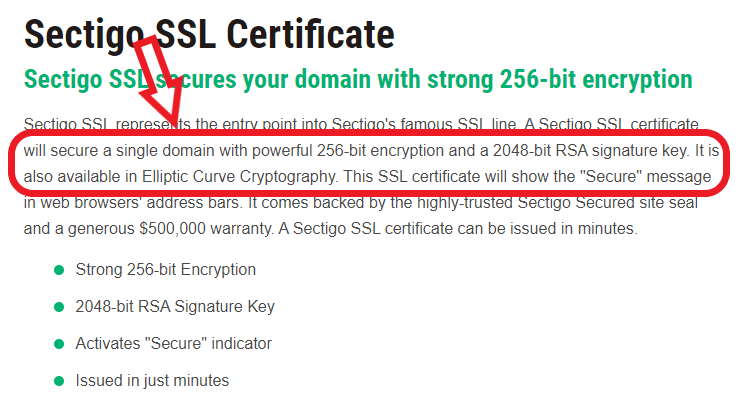
  • Provides strong encryption of 256-bit with a 2048-bit signature key
  • Offers rapid validation and issuance
  • Comes with a warranty of $500,000
  • Features fully automated validation
  • Activates “Secure” indicator within minutes
  • Comes with a dynamic Sectigo site seal
  • Offers a wide range of compatibility with mobile and browsers
  • Provides infallible backend support
secure by sectigo site seal

When you purchase a Sectigo Multi-Domain/UCC SSL certificate from SectigoStore.com, you can enjoy a significant discount of 54% for a five-year bundle. This means you can secure up to 250 SANs for as little as $127.20 per year.

Vendor Price: $1,396 for 5 years

SectigoStore.com Price: $636 for 5 years

Read More

2. PositiveSSL EV Multi-Domain

A Positive SSL EV Multi-Domain SSL/TLS certificate is an affordable option for enterprises that want to secure multiple domains and specified subdomains under one certificate. Using an EV certificate enables you to display your business’s verified information in both the browser and in the certificate details. Another huge benefit is that this certificate secures up to 250 domains and IP addresses at a very affordable price.

The features of a PositiveSSL EV multi-domain certificate are the following:

  • Provides strong encryption of 256-bit with a 2048-bit signature key
  • Offers rapid validation and issuance
  • Comes with a generous warranty of $1 million
  • Features fully automated validation
  • Results in reduced administrative burdens
  • Comes with a dynamic PositiveSSL site seal
  • Offers a wide range of compatibility with mobile and browsers
  • Provides reliable backend support
secure by positiveSSL site seal

When you buy a PositiveSSL EV Multi-Domain certificate from SectigoStore.com, you can enjoy a discount of 34% on a five-year bundle. This means you can secure up to 250 SAN domains for prices starting at just $144.86 per year.

Vendor Price: $1,100 for 5 years

SectigoStore.com Price: $724.28 for 5 years

Read More

3. Sectigo OV UCC SSL Certificate

If you like the Sectigo brand name but want higher validation than what the Sectigo Multi-Domain/UCC SSL Certificate offers, then here’s a certificate you should know about. A Sectigo OV UCC SSL certificate is a premium certificate capable of securing up to 250 SAN domains and IP addresses. As such, this certificate gives you freedom from repetitive certificate management tasks by only having to manage one certificate instead of many. It’s a cost-effective option that’s easy for legitimate businesses to obtain.

The following features will accompany your Sectigo OV UCC SSL certificate:

  • Provides strong encryption of 256-bit with a 2048-bit signature key
  • Offers rapid validation and issuance
  • Comes with a warranty of $500,000
  • Features fully automated validation
  • Activates “Secure” indicator within minutes
  • Comes with a dynamic Sectigo site seal
  • Offers a wide range of compatibility with mobile and browsers
  • Provides infallible backend support
secure by sectigo site seal

When you buy a Sectigo OV UCC SSL certificate from SectigoStore.com, you can enjoy a discount of 39% on a five-year bundle. This means you can secure up to 250 SAN domains for as little as $140.00 per year.

Vendor Price: $1,140 for 5 years

SectigoStore.com Price: $700 for 5 years

Read More

Frequently Asked Questions on UCC SSL Certificate (FAQs)

What is a UCC/SAN SSL certificate?

A unified communication certificate / subject alternative name (UCC/SAN) SSL certificate is a super certificate. It’s powerful enough to secure multiple FQDNs and specified subdomains under a single certificate. As a result, you don’t have to manage many individual certificates for your websites.

A company that owns multiple SAN domains can use a single UCC SAN SSL certificate to make their certificate lifecycle management tasks a whole lot easier.

Save 82% on UCC SSL Certificate

Get the lowest prices on trusted SSL certificates from Sectigo.

Shop Now

What is an SSL certificate warranty and what does it cover?

An SSL certificate warranty offers protection for your customers in the event that they face losses or damages as the result of an improperly issued certificate. Basically, the issuing CA’s warranty provider would then have to cover the damages that result up to the warranty amount. The individual warranty amount varies from one certificate to the next.

SectigoStore.com offers certificates with warranties ranging from $50,000 to $10 million.

Which are the most trusted CAs or Brands of UCC/multi-domain SSL certificates?

Some of the most trusted names in the SSL market are Sectigo and PositiveSSL.

What is a multi-domain wildcard certificate?

A multi-domain wildcard certificate covers multiple SAN domains and an unlimited number of subdomains under a single certificate.

This differs from a multi-domain certificate, which can cover multiple SAN domains under a single certificate. (You also can include specific subdomains as well among your total of 250 domains.) Typically, a vendor will specify a maximum number of domains that a single multi-domain certificate can cover.

A multi-domain wildcard certificate also differs from a wildcard certificate, which covers an unlimited number of subdomains on a single level in addition to your primary domain under one certificate. 

How can I renew my SSL certificate?

Renewal of the certificate is basically buying it all over again. The CA will do the same validation process for the renewal of the certificate. The remaining time of your current certificate can be carried over to your new certificate.

How can I check whether my UCC SSL certificate is installed properly?

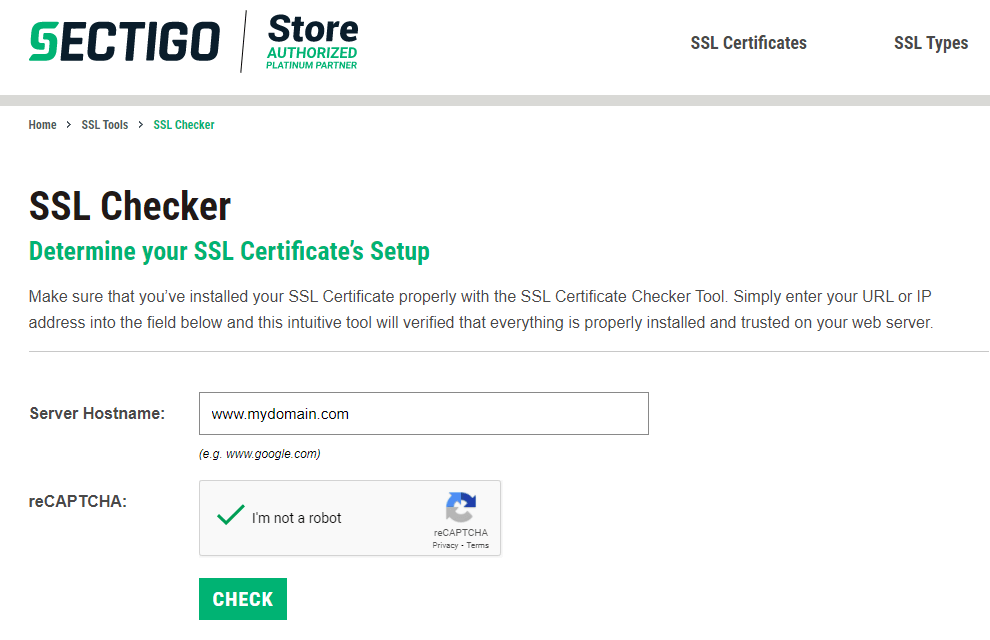
You can use our SSL Checker tool to verify that your certificate is installed correctly and is working. It’s super easy — all you need to do is enter your URL or IP address into the field and select the reCAPTCHA box to check your certificate.

For instance, if the name of your website is www.mywebsite.com and you are checking if your SSL certificate is installed properly, your screen would look like this:
ssl checker

A screenshot of SSL Checker Tool from SectigoStore.com


How can I add a subject alternative name (SAN) domain to an SSL certificate?

There are basically two ways to add subject alternative name domains to your SAN certificate. One is when you buy a SAN certificate and the second is at a later stage. Let’s quickly explore these two methods:

How to Add a Subject Alternative Name Domain at the Time of Buying a SAN Certificate

While buying a SAN certificate, you can specify the number of subject names you want to be added in the certificate when you make your initial purchase. You can just add the additional subject names in the space provided.

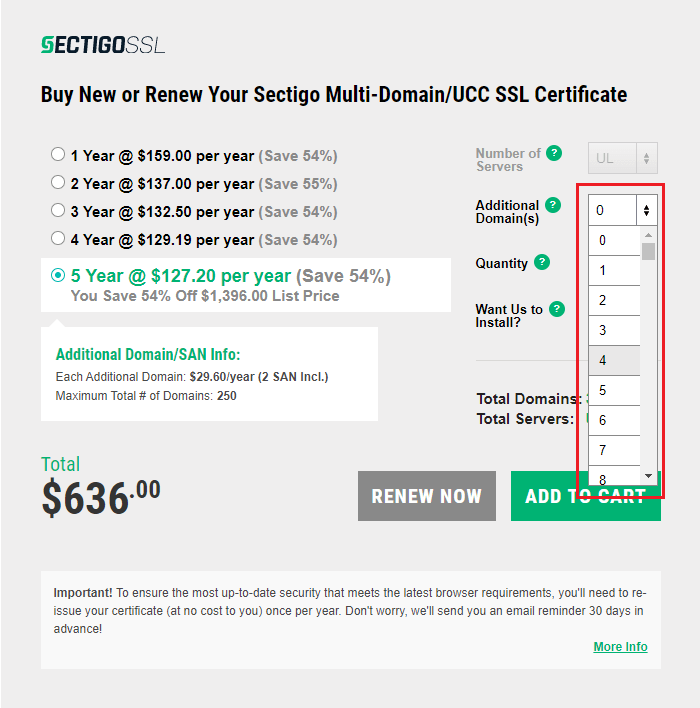
For example, if you purchase Sectigo Multi-domain/UCC SSL Certificate, you can select the number of additional domains you will need at the time of purchase. The screenshot attached below shows where you can select the additional number of domains you wish to secure. You will be given a form where you can enter the additional domain names to be included in your certificate.
sectigo multi domain ucc ssl

A screenshot of purchase order form where you can select the number of additional domains


How to Add a Subject Alternative Name Any Other Time During the Certificate’s Lifecycle

You can add additional subject names at the time of your certificate’s reissuance. Click on “Re-issue” under “Order Details.” Add the number of additional SANs you need on this page.

You can input the names of SANs in the field “Secure Additional Domains” again under “Order Details” page. You can see the number of total SANs and the number of used SANs in under the product details. You can add and remove SANs based on your organization’s needs.

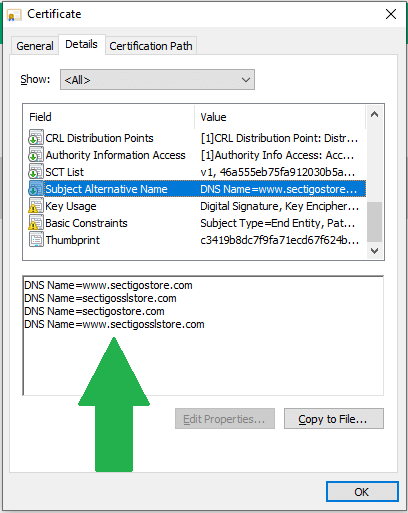
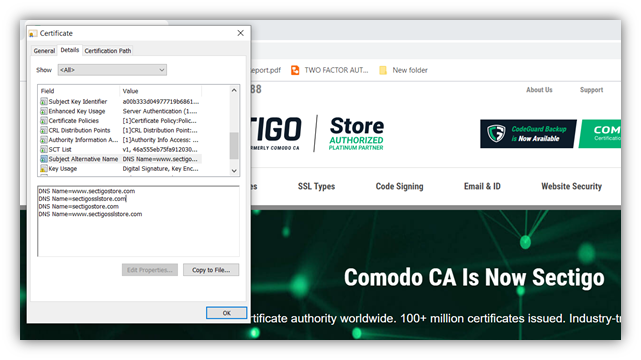
The following screenshot of a UCC/SAN certificate issued to SectigoStore.com shows the additional subject alternative name domains secured by the same certificate.
sectigostore certificate details

A screenshot of a SAN certificate’s subject alternative name information.


5 Low Cost SSL Certificates That Will Secure Your Ecommerce Business in 2026

Cost plays a vital role while buying an SSL certificate for your business website. Our team at SectigoStore.com has put together a list of SSL certificates to help you choose from the best low-cost SSL certificates in 2026 from the popular certificate authority Sectigo

An SSL certificate has become a mandatory requirement to carry on a successful online presence. Without an SSL certificate, your website will lose the trust of your customers and ranking with search engines. But when it comes to choosing the right or best low cost SSL certificate for your business, there are many things to consider.

Sure, all publicly trusted certificates have to meet the same security standards and requirements. However, there’s more to buying a certificate than just the encryption and security they provide; there’s also all of the “extras” you get along with them. And knowing the difference and value of these features and benefits when comparing dozens of certificates can be a bit overwhelming.

This is why our team has compiled a list of low cost SSL certificates in 2026 from the world-renowned certificate authority (CA) Sectigo.

low cost ssl certificates

5 Low Cost SSL Certificates in 2026 From Popular Certificate Authorities

This is a comprehensive list of all the inexpensive SSL certificates you can buy for your website. All the CAs included here are reliable and well-known. Therefore, the visitors of your website will be able to recognize that your site is secure.

1. PositiveSSL (DV)

PositiveSSL is one of the most affordable SSL certificates in the market. Getting a DV with PositiveSSL is easy, fast, and convenient. You can discard your “Not Secure” warning with a low cost SSL certificate. This single-domain certificate comes with an array of features that are mentioned below:

  • Features a powerful 256-bit symmetric encryption and a 2048-bit signature key
  • Includes a $50,000 warranty
  • Comes with a dynamic PositiveSSL Site Seal
  • Offers compatibility with 99% of mobile and web browsers
  • Provides free and easy access to support (24/7/365)
  • Comes with unlimited certificate reissuances and server licenses during the certificate’s lifetime
  • Offers a 30-day money-back guarantee

The benefits of buying your PositiveSSL DV certificate from SectigoStore.com are found in financial discounts and customer support. We offer up to 87% discount on this low cost certificate and offer 24/7/365 support. You can get a DV as low as $8.95 per year from us.

Read More

2. PositiveSSL Wildcard (DV)

Do you have multiple domains to secure in a limited budget? Then PositiveSSL Wildcard DV is an affordable yet reliable option for you. It covers an unlimited number of single-level subdomains under one easy-to-manage certificate. Some of the features of PositiveSSL wildcard DV are as follows:

  • Features a powerful 256-bit symmetric encryption and a 2048-bit signature key
  • Includes a $50,000 warranty
  • Comes with a dynamic PositiveSSL Site Seal
  • Offers compatibility with 99% of mobile and web browsers
  • Provides free and easy access to support (24/7/365)
  • Includes unlimited certificate reissuances and server licenses during the certificate’s lifetime
  • Comes with a 30-day money-back guarantee

When you buy a PositiveSSL Wildcard DV from SectigoStore.com, you can enjoy a discount of up to 67%. This means you can get this DV certificate for as little as $78.32 per year.

Read More

3. PositiveSSL Multi-Domain Wildcard

PositiveSSL multi-domain wildcard is an affordable and flexible solution that enables you to secure all your subject alternative name domains (up to 1,000 SANs) and subdomains in a single certificate. Therefore, you don’t have to buy and manage multiple certificates to secure all your domains. The salient features of this product are as follows:

  • Features a powerful 256-bit symmetric encryption and a 2048-bit signature key
  • Includes a $50,000 warranty
  • Comes with Dynamic PositiveSSL Site Seal
  • Offers compatibility with 99% of mobile and web browsers
  • Provides free and easy access to support (24/7/365)
  • Includes unlimited certificate reissuances and server licenses during the certificate’s lifetime
  • Offers a 30-day money-back guarantee

A PositiveSSL Multi-Domain Wildcard DV can be bought directly from the vendor at full price or from SectigoStore.com at a discount. We offer this product at half the retail price. You can get a DV as low as $159.20 per year from our website.

Read More

4. Sectigo Wildcard SSL Certificate

The Sectigo Wildcard SSL certificate comes with a Sectigo Site Seal. Having an SSL certificate will allow you to get rid of the “Not Secure” warning. For just $0.54 per day, you can secure your website using encryption and protect your customers’ sensitive data transmissions. As this is a wildcard certificate, you can secure one primary domain and unlimited subdomains (on a single level) registered under that domain under a single certificate.

The other features of this product are as follows:

  • Features a powerful 256-bit symmetric encryption and a 2048-bit signature key
  • Includes a $500,000 warranty
  • Comes with a dynamic Sectigo Secure Site Seal
  • Offers compatibility with 99% of mobile and web browsers
  • Provides free and easy access to support (24/7/365)
  • Gives you unlimited server licenses and certificate reissuances for the life of the certificate
  • Comes with a 30-day money-back guarantee

Sectigo Wildcard DV can be bought from SectigoStore.com at a discount of up to 45%. As such, you can get this DV certificate starting at just $199.20 per year.

Read More

5. Essential SSL Wildcard Certificate

An Essential SSL Wildcard Certificate secures your primary domain and unlimited single-level subdomains under one umbrella. Coupled with a Sectigo Secure Site Seal, this certificate gives you the coverage and brand recognition you need at an affordable price.

The following features describe this product well:

  • Features a powerful 256-bit symmetric encryption and a 2048-bit signature key
  • Includes a $10,000 warranty
  • Comes with Dynamic Sectigo Site Seal
  • Offers compatibility with 99% of mobile and web browsers
  • Provides free and easy access to support (24/7/365)
  • Comes with unlimited server licenses and certificate reissuances for the life of the certificate
  • Offers a 30-day money-back guarantee

This DV certificate can be bought from SectigoStore.com at a discount. We offer this product at a 60% discounted price. You can get a DV starting at $79.84 per year from our website.

Read More

Frequently Asked Questions on Low Cost SSL Certificates

Where can I get cheap SSL certificate for my website?

If you want to buy a low cost SSL certificate, you can purchase one from one of the most trusted websites in the market — SectigoStore.com. We offer a variety of SSL certificates — as well as code signing and email signing certificates — for you to choose from at significantly discounted prices.

To make a purchase on SectigoStore.com, follow the steps below:

  1. Go to SSL Types.
  2. Select the type of certificate you want to buy (for example, Wildcard SSL Certificates).
  3. Go through the list of certificates and select the one best suited for your needs
  4. Click Learn More to explore the features of the certificate in detail.
  5. If you are in doubt, seek the help of a Security Expert by clicking on the “Chat with a Security Expert” option.
  6. Select the validity period for the certificate.
  7. Select the number of certificates you need.
  8. Click on Add to Cart.

sectigo positivessl wildcard
A screenshot of your purchase showing validity period of the plan and number of certificates

  1. Fill in your details in the form
  2. Review your order
  3. Make the Payment
  4. SSL certificate is yours to install
  5. You can choose to install it on your own or ask for assistance

Can I get an SSL certificate for free?

Yes, theoretically you could get an SSL certificate for free. However, free SSL certificates are only available with domain validation and don’t come with warranties or IT support. So, if you’re having difficulties or issues with your certificate, you’re on your own or have to rely on forums for help.

Furthermore, the Anti-Phishing Working Group (APWG) reports that DV certificates, commonly issued by free SSL/TLS certificate providers, are commonly associated with phishing websites. Therefore, it’s better to buy an OV or EV SSL certificate from a trusted CA than to opt for a free certificate.

At SectigoStore.com, you can get an InstantSSL OV certificate for as little as $30.80 per year! That’s a savings of 81%. Or, even better, you can even get a PositiveSSL EV certificate for as little as $79.84 per year, and that one comes with a $1 million warranty.

Why do OV and EV certificates cost more than DV SSL certificates?

A DV certificate only includes the validation of the domain name. Most CAs have automated processes set up to verify you actually own or control the domain in question. An OV certificate requires light validation of business by the CA. A CA will carry out the most stringent validation before issuing an EV SSL certificate.

So, why should one choose EV and OV over DV SSL certificates? The benefits of an OV or EV certificate are as follows:

  • These certificates provide higher levels of identity assurance to website visitors because of their light (OV) or extensive (EV) business validation processes.
  • A website visitor can view in-depth, verified information about the organization on the certificate and in the browser if you have an EV certificate.
  • Your customers can view the verified details about your organization on the certificate if you have an OV SSL. The details mentioned on the OV certificate are limited compared to those on an EV certificate.

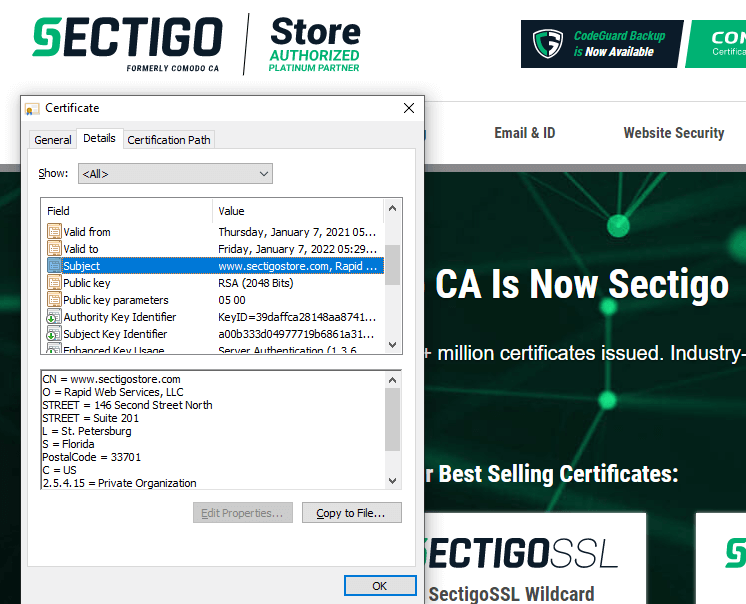
The following figure shows the screenshot of an EV certificate. When you click on the subject field of an EV certificate, you can see the verified details about the organization. This helps the customer to place a greater amount of trust in your website and brand.


sectigostore website certificate information
A screenshot of the verified details in an EV certificate of SectigoStore.com

What is the validity period of an SSL certificate?

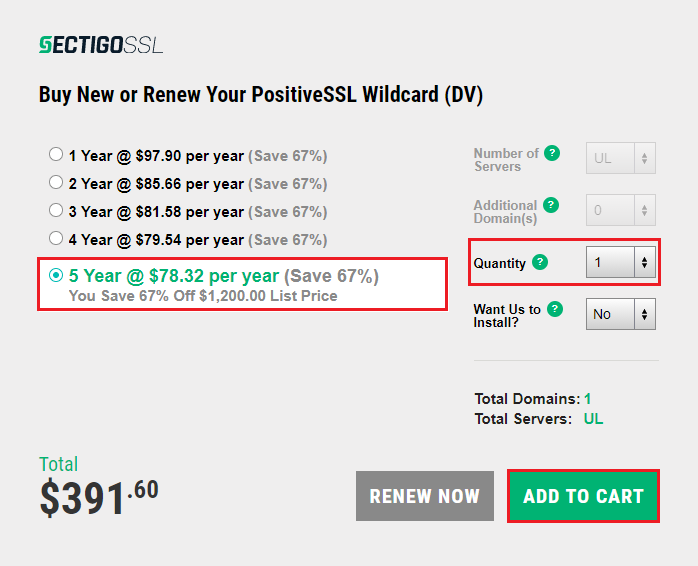
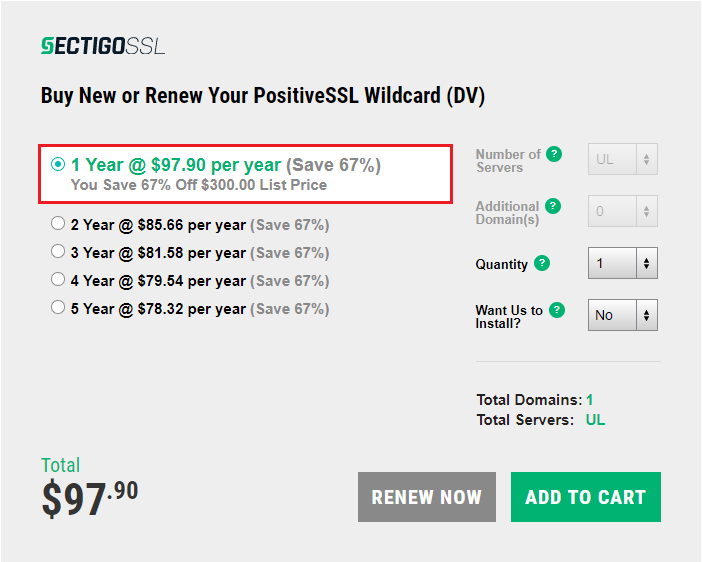
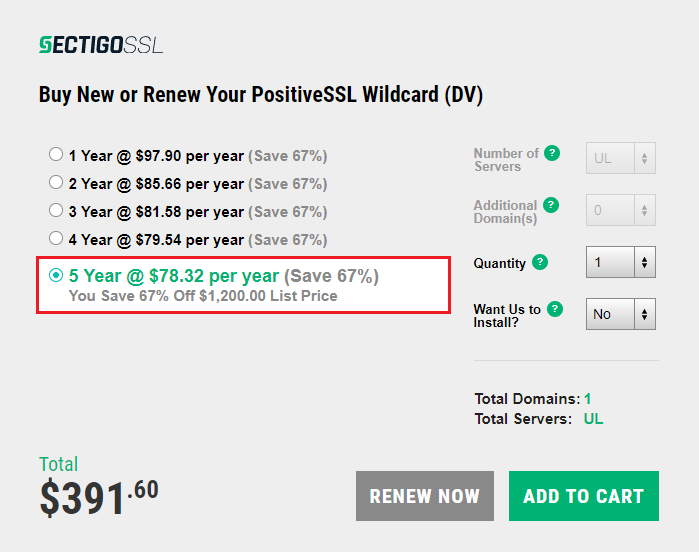
An SSL certificate is typically valid for one year (or, more specifically, 397 days). However, you can save money by purchasing your certificate in multi-year bundles. The average cost per year of the SSL certificate decreases when you buy a longer contract. For example, a one-year contract on a PositiveSSL Wildcard costs $97.90 per year. But if you buy a five-year contract, that same certificate will cost $78.32 per year.  


annual cost of sectigo positivessl wildcard
A screenshot of the annual cost of a one-year plan for a PositiveSSL Wildcard Certificate

five year cost of sectigo positivessl wildcard
A screenshot of the annual cost of a five-year plan for a PositiveSSL Wildcard Certificate

How long does the SSL certificate validation process take?

The waiting period for validation varies based on the level of validation each certificate offers. For example:

  • Domain validation — The validation process for this certificate only takes a few minutes. The process is automated, so you can have an SSL certificate for your site almost instantaneously.
  • Organization validation —The validation process takes one to three days as the CA carries our light verification of the business organization.
  • Extended validation — This level of validation typically takes 3-5 days. A CA needs to carry out in-depth verification of the business before they can issue an EV certificate. Thus, this kind of SSL certificate takes the longest to be issued.

Get the Top-Notch Brand Sectigo’s SSL only For $8.78/Year!

Save 79% on SSL Security Certificates! Get the lowest prices on trusted SSL certificates from Sectigo.

Shop Now

The Top 9 Cheap SAN Certificates You Should Know in 2026

For the companies who own multiple domain names, SAN (subject alternative name) certificates or multi-domain SSL certificates are a way to secure those websites. Our team at SectigoStore.com has put together a list of the top 9 cheap SAN certificates for 2026

When you own more than one domain, you must find a way to secure all of them to enable HTTPS on your site. And what if you also have IP addresses you want to cover? Sure, you can buy individual SSL certificates… or you can purchase a single cheap SAN certificate that can secure all of your subject alternative name domains.

It often becomes a tedious task to buy separate certificates and manage them. You can buy wildcard certificates for all your subdomains under one domain, but that also entails buying multiple certificates for multiple main domains. This becomes unnecessarily complex and costly. For this purpose, SAN certificates are introduced.

Let’s explore our list of nine cheap SAN certificates you can use to secure your subject alternative name domains.

Top 9 Cheap SAN Certificates in 2026

Many SAN certificate providers offer great prices for your security. SAN certificates are available in all three categories of validation: (domain validation (DV), organization validation (OV), and extended validation (EV).

Without further ado, let’s check out the first item on our list of cheap SAN certificates.

1. Sectigo Multi-Domain/UCC SSL Certificate

Sectigo Multi-Domain/UCC SSL Certificate is our preferred certificate due to its many distinctive features. It is a certificate specially designed for MS Exchange and MS Communications servers. Nevertheless, it can be deployed on other kinds of servers as well. This DV certificate can cover up to a total of 250 domains.

Some of the features of this certificate are:

  • Rapid certificate issuance (within minutes).
  • Strong encryption (256-bit AES encryption and 2048-bit RSA keys).
  • Reliable Sectigo Secure site seal.
  • Fully automated domain control validation.
  • Worry-free $500,000 warranty.

You can buy a SAN certificate for five years that secures all your domains at a discount of 54% for prices starting at just $127.20 per year.

Vendor Price: $1,396 for 5 years
SectigoStore.com Price: $636 for 5 years

Read More

2. Sectigo OV Multi-Domain SSL Certificate

This is an organizational validation SAN certificate that gives you in-depth validation for all your domains. You can secure up to 2,000 domains and IP addresses with a single Sectigo OV Multi-Domain SSL Certificate!

The issuing certificate authority (CA) will conduct a light validation process on your business prior to issuing all organization validated (OV) SSL certificates. This means that your certificate will be issued within one to three days.

Sectigo has strong backend support for installing your certificate and site seal in the form of written instructions and support tickets. The other features of the Sectigo OV Multi-Domain SSL Certificate are as follows:

  • Strong 256-bit encryption that meets NIST and CA/B Forum Standards.
  • High-powered 2048-bit RSA signature key.
  • Great $1 million warranty.

You can buy this SAN certificate at a massive discount of up to 61% from SectigoStore.com. You can secure all your domains and IP addresses starting at just $140 a year.

Vendor Price: $1,396 for 5 years
SectigoStore.com Price: $636 for 5 years

Read More

3. Sectigo EV Multi-Domain Certificate

If you want enterprise-level validation for your business, the Sectigo EV multi-domain certificate is the best choice for you. This EV certificate secures up to 250 domains and IP addresses to free you from the responsibilities of buying and managing multiple certificates.

When you buy this certificate, it enables you to assert your verified organizational identity in a way that assures site visitors that your company is legitimate and all the data transmitted between your website and the customer’s browser is secure. EV certificates require up to five days for issuance due to their in-depth validation processes.

EV certificate offers the highest level of validation for your site. The salient features of this product are as follows:

  • Strong 256-bit AES encryption that meets NIST and CA/B Forum standards and baseline requirements.
  • Dependable 2048-bit RSA signature key.
  • Available with elliptic curve cryptography (ECC).
  • Worry-free $1.75 million warranty.
  • Sectigo Secure site seal.

Buy this SAN certificate from SectigoStore.com to enjoy up to a 36% discount. You can secure all your domains and IP addresses (maximum of 250) starting at just $279.20 a year.

Vendor Price: $2,196 for 5 years
SectigoStore.com Price: $1,396 for 5 years

Read More

4. PositiveSSL Multi-Domain Wildcard (DV)

Do you want to secure all your domains and unlimited subdomains under one certificate? Then this is a perfect cheap SAN certificate for you. It covers up to 2,000 domains and unlimited subdomains. Simply use an asterisk (*) for all accompanying subdomains you wish to cover during the CSR generation process.

The distinctive features of this certificate are:

  • Wide coverage of up to 2,000 fully qualified domain names (FQDNs).
  • Speedy validation and certificate issuance.
  • Reliable 256-bit encryption and 2048-bit signature key strength.
  • Ample $50,000 warranty for your peace of mind.
  • Dynamic PositiveSSL site seal.

This certificate is your way to ditch your “Not Secure” status on browsers and encrypt your data transmissions for just $159.20 per year! SectigoStore.com offers this certificate at half the price of other vendors.

Vendor Price: $1,596 for 5 years
SectigoStore.com Price: $796 for 5 years

Read More

5. PositiveSSL EV Multi-Domain

PositiveSSL EV Multi-Domain certificate is the most affordable EV certificate to secure all your domains. It can secure up to 250 separate domains and IPs under one single certificate. Being an extended validated certificate can add a padlock on the address bar to ensure your customers that your site is secure. Because this certificate requires an extensive validation process, the issuance process can take up to five days.

The following additional features will enhance your PositiveSSL EV Multi-domain certificate:

  • Strong 256-bit encryption with a trustworthy 2048-bit RSA signature key.
  • Generous $1 million warranty.
  • Dynamic PositiveSSL site seal.

You can buy this cheap SAN certificate at a discount of up to 34% from SectigoStore.com. You can secure all your domains and IP addresses (250 maximum) at prices starting at just $144.86 a year.

Vendor Price: $1,100 for 5 years
SectigoStore.com Price: $724.28 for 5 years

Read More

6. PositiveSSL Multi-Domain (DV)

PositiveSSL Multi-Domain certificate is a DV certificate to secure your multiple domains. It is one of the cheapest SAN certificates available. It can cover up to 2,000 different domain names along with their subdomains under one certificate. This certificate offers you the following features:

  • Fast certificate issuance (within minutes).
  • Strong 256-bit encryption and a 2048-bit RSA signature key.
  • Ample $50,000 warranty of in case anything goes wrong.
  • Dynamic PositiveSSL secure site seal.

When you buy a five-year plan for this PositiveSSL multi-domain certificate directly from SectigoStore.com, you’ll enjoy an 82% discount. This means you can enjoy this certificate at a low cost of just $25.60 per year!

Vendor Price: $700 for 5 years
SectigoStore.com Price: $128 for 5 years

Read More

7. Sectigo OV UCC SSL Certificate

The Sectigo OV UCC SSL Certificates are designed to secure MS Exchange and Communication servers in particular. However, they also secure other servers just as easily with the same efficiency. Each Sectigo UC certificate secures up to 250 domains and IP addresses under a single certificate. As an organizational validation certificate, it requires light business vetting, meaning that issuance can take one to three days.

The features of this certificate are as follows:

  • Strong 256-bit encryption with a 2048-bit RSA signature key.
  • Generous $1 million warranty.
  • Sectigo Secure site seal.

SectigoStore.com offers a 39% discount when you buy a Sectigo OV UCC SSL certificate 5-year plan.  This means you can own this certificate for as little as $140 per year.

Vendor Price: $1,140 for 5 years
SectigoStore.com Price: $700 for 5 years

Read More

8. Sectigo OV UCC Wildcard SSL Certificate

Although the Sectigo OV UCC Wildcard SSL Certificate is specifically designed for Microsoft Exchange and Communication servers, they secure other servers just as well. To reduce the administrative expenses and energy, you can secure 250 domains and IP addresses plus unlimited subdomains under these domains using this single UC certificate. It takes a few days to validate your business and issue your certificate.

The main features that accompany this certificate are as follows:

  • Powerful 256-bit encryption and a 2048-bit RSA signature key.
  • Trustworthy Sectigo Secure site seal.
  • Generous $1 million warranty.

When you buy a Sectigo OV UCC Wildcard SSL certificate from SectigoStore.com, you can enjoy up to a 46% discount on your purchase. This means you can get this certificate for as little as $639.20 per year!

Vendor Price: $5,928 for 5 years
SectigoStore.com Price: $3,196 for 5 years

Read More

9. Sectigo OV Multi-Domain Wildcard SSL Certificate

This multi-domain wildcard certificate can secure all your domains and subdomains under one certificate. This is one of the most versatile certificates available as it covers up to 2,000 domains and IPs and all of their registered subdomains.

The Sectigo OV Multi-Domain Wildcard is an organizational validation certificate, meaning that the CA will need to first vet your business before issuing a certificate to you. Due to this process, certificates will usually take one to three days to issue.

The other salient features of this certificate are:

Buy a five-year plan for your Sectigo OV Multi-domain Wildcard SSL certificate from SectigoStore.com to enjoy up to a 59% discount. You can get your certificate for as little as $639.20 per year.

Vendor Price: $7,842 for 5 years
SectigoStore.com Price: $3,196 for 5 years

Read More

Frequently Asked Questions (FAQs) About SAN Certificates 

What Are SAN SSL Certificates?

A subject alternative name certificate, or what’s also known as a multi-domain SSL certificate,is a digital file that enables you to secure many or all of your domains and specified subdomains under a single certificate. For example, you can secure all of the following using a single SAN certificate:

  • mywebsite.com,
  • www.mywebsite.com
  • mywebsite.net, and
  • mywebsite.org.

How many domains or subdomains does a SAN certificate cover? That answer depends on the individual certificate. But the takeaway here is that your company has to buy and manage only one single certificate instead of an array of individual SSL certificates. The SAN certificates are also cost-effective for the company.

The following screenshot shows the subject alternative name field of the certificate we use to secure alternate hostnames SAN certificates for SectigoStore.com:

san ssl detail information

The above figure shows the different host names (sites, common names and IP addresses) we added to the subject alternative name field for SectigoStore.com’s SSL certificate.

What Is Covered Under a SAN Certificate?

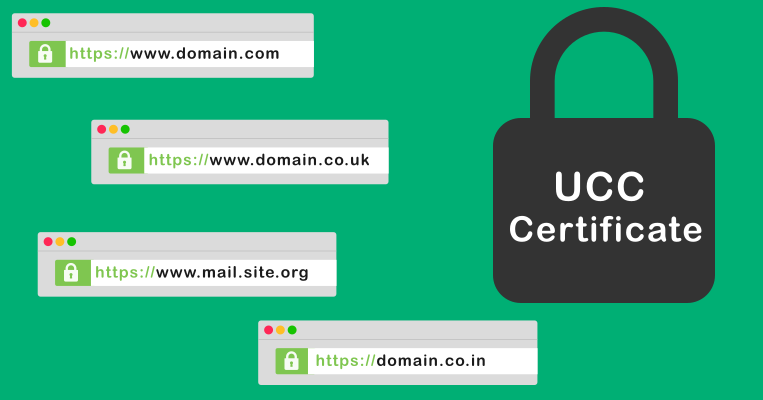
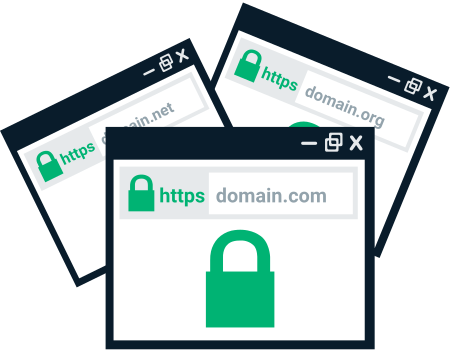
SAN certificate covers multiple domains under a single certificate. The following figure is the representation of some of the domains covered in a single certificate of an example website domain.com:

multi domain

A figure showing examples of domain names covered under a single SAN certificate

What Are the Advantages of SAN Certificates?

SAN certificates cover multiple domains under a single certificate. There are many benefits of SAN certificates as opposed to managing multiple individual SSL certificates. Here are a few of the advantages:

  • Buying a single SAN certificate is often cheaper than buying a bunch of separate SSL certificates for all your domains.
  • Managing a single SAN certificate is easier than multiple SSL certificates.
  • Re-issuing your certificate through SectigoStore.com is simple and easy.
  • Adding additional subdomains can occur anytime during the life of the certificate.
  • Using a SAN SSL certificate ensures your site is compatible with virtually all major mobile web browsers, computers and mobile devices.
  • Securing your site with strong encryption is easy with a certificate that affords up to 256-bit encryption and a 2048-bit RSA signature key.

Save 82% on SAN SSL Certificate

Get the lowest prices on trusted SSL certificates from Sectigo.

Shop Now

What’s the Difference Between Wildcard and SAN Certificates?

A wildcard SSL certificate covers one primary domain and an unlimited number of single-level subdomains in a single certificate. On the other hand, SAN certificates cover a specific number of SAN domains and specified subdomains — up to the max number your certificate allows. This is the main difference between a wildcard certificate and a SAN certificate.

The second difference between both types of certificates is the validation they provide. SANs are available in three validation levels: DV, OV, and EV. Wildcards, on the other hand, are available with DV and OV only. That’s because the industry prohibits the issuance of extended validation for wildcard and (multi-domain wildcard) certificates.

Conclusively, if you just have only one domain and a handful of subdomains to secure, a wildcard certificate should suffice. Alternatively, you should opt for a SAN or even a multi-domain wildcard SSL certificate if you have to secure multiple domains and their subdomains. It all depends on your organization’s requirements.

SAN SSL Certificates Wildcard SSL Certificates
1. What does a SAN Certificate cover?

  • One primary domain An unlimited number of single-level subdomains

1. What does a Wildcard certificate cover?

  • One primary domain
  • An unlimited number of single-level subdomains

2. What level of validation is provided?

  • Doamin validation (DV)
  • Organizational validation (OV)
  • Extended Validation (EV)

2. What level of validation is provided?

  • Doamin validation (DV)
  • Organizational validation (OV)

Is a SAN Certificate Maintenance Free?

Not exactly. Every SSL/TLS certificate has a validity period of one year (397-398 days more specifically depending on the CA). To ensure continuity and prevent any certificate expiration-related service outages, you must re-issue that certificate.

If you have many domains to secure, SAN certificates are your answer. You can buy SAN certificates in one-year increments or purchase them in multi-year bundle plans to save money. You just have to re-issue them before they expire or else you’ll have to go through the validation process again.

So, let’s buy SAN SSL certificates but let’s not forget that it is not 100% maintenance-free. It does require annual re-issuance due to browser requirements.

Final Words on the 9 Best Cheap SAN Certificates in 2026

Our list of the nine best cheap SAN certificates in 2026 can be your go-to guide when you plan to buy a SAN certificate. You can select a SAN certificate that fulfills your site’s security requirements and is within your budget.

No matter whether you prefer PositiveSSL, EssentialSSl or Sectigo SSL certificates, they’re all very trustworthy and reliable. As a primary vendor for Sectigo Store certificates, we can provide you best discounts on all the certificates on our website sectigostore.com.

SSL Validation Guide for EV, DV & OV SSL Certificates

Are you planning to buy an SSL/TLS certificate for your website? The first question you might face is the level of SSL validation you want for yourself. It’s natural to have questions about the validation process for your SSL certificate. This is a brief SSL validation guide for EV, DV, and OV SSL certificates that will assist you to glide by the process swiftly.

What Are the Benefits of Having an SSL Certificate?

SSL certificates are not so much a “recommendation” as they are a necessity for a successful website. SSL certificates basically serve two purposes:

  1. Encryption. SSL certificates (or, more accurately, TLS certificates) encrypt data while it’s in transit between your customer’s computers and your servers. 
  2. Authentication. Having an SSL/TLS certificate for your site authenticates the identity of your business website. It does this through the use of a trusted third party known as a certificate authority (CA).

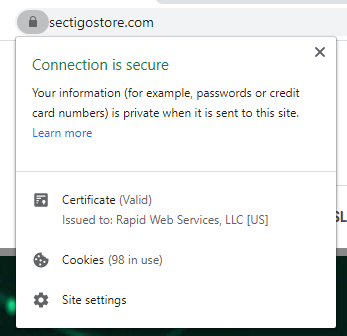
An SSL certificate is easy to spot on the address bar. The padlock and “HTTPS” in your web address bar, as well as a site seal are a few of the signs indicating that a CA has validated your website. When a client see at these signs, it becomes obvious that the site is verified and is genuine. This helps the customers to place their trust in and promote your business.

SSL Validation for Domain Validation (DV) Certificates

This is the basic SSL certificate, which only verifies that the domain belongs to you. The client sends the certificate signing request (CSR) code or the public key to their chosen certificate authority for verification. This kind of SSL certificate validates online automatically, which means that the certificate is issued within minutes. The CA verifies that this key is actually coming from the server on which the website is hosted. There are three methods that a CA can use to verify this fact:

1. Email Verification

The CA sends a link to an email address that is accessible to a legitimate person only. The registered email address should be hosted on the domain for which the certificate is being requested and not generic email hosting accounts like Gmail, Yahoo, etc. The email address also should be listed on the WHOIS record of your domain. The CA will accept one of the five pre-defined email addresses that you can select:

Once you click on the link sent by the CA, your verification will be complete.

2. File Verification

If your web host plan or your domain does not offer you an email address, you will not be able to complete the email verification step. The alternative is to go for file verification. In this process, the CA will send you one or more files that you will have to upload to a specific place within your site’s root directory. Once you do this, your verification will be complete.

3.  CNAME-Based Verification

A canonical name (CNAME) record is a type of record in your DNS (Domain Name System) that specifies one domain name (an alias) to another (the canonical name).

To clarify the above, suppose you have the same application and the same server host for yoursite.com and www.yoursite.com. You can create a record for yoursite.com that points to the server and a CNAME record for www.yoursite.com that point to the yoursite.com. This will help you get rid of duplication of records. This will lead to both the addresses point to the same IP address.

For CNAME based verification, the CNAME records should be created in your domain name system, which points back to the CA for the verification. The CA will share two hashes with you, namely MD5 and SHA-256. You can enter the two hashes in your CNAME DNS record, which will lead the CA to complete the verification.

Any one of the above verification methods is sufficient for the domain validation process. If you think domain validation is the right option for you, you can get your DV SSL certificate within a matter of minutes by purchasing it from a reputable CA like Sectigo.

SSL Validation for Organization Validation (OV) Certificates

When you want better verification and trust than what a DV certificate can provide, you can go one step further by getting organization SSL validation.

OV SSL certificate validation is what we call “business validation,” and it falls between the DV and EV SSL certificate validation levels. In addition to checking domain validation, the CA will conduct additional verification of your business or organization to ensure it’s legitimate. As you can imagine, this means your business needs to meet certain requirements. The requirements of OV SSL validation are as follows:

1. Organization Authentication

Organization authentication is done by the CA to check whether you’re a legitimate legal entity that is registered and active in the state or country you claim. As part of this process, the CA will check the address you provide against official online government databases. If there are no public government records that substantiate your organization’s existence, then the CA can verify your information through alternative methods.

Official Registration Documents

Official registration documents include Articles of Incorporation, chartered licenses, or other documents issued by the government to prove your legality. These documents include:

  • Dun & Bradstreet Reports. Dun & Bradstreet is a firm that’s known for their reliability and trustworthiness. What they do is provide financial reports on companies to help reduce risks. Their report satisfies more than one requirement of the CA for you to obtain the OV certification.
  • Professional Opinion Letters (POLs). Professional opinion letters, or what are known as legal opinion Letters, are highly valued by CAs for the authentication of your organization. They can fulfill many requirements for both OV and EV SSL validation. POLs can be obtained from accredited attorneys or accountants who can vouch for the legitimacy of your enterprise. A signed POL can effectively satisfy four out of five requirements of OV SSL validation.

2. Locality Presence

For the purpose of locality presence, the CA will need a proof of your active local presence. You can either prove your presence through your registration information on the public government records or the other alternatives mentioned for organization authentication. The CA will verify these against your application and will give you the go ahead.

3. Telephone Verification

The CA will want to verify your telephone number is legitimate by comparing it to government public records. If it’s not on these records, a CA can also rely on third-party directories. If the telephone number matches, this verification step is complete.

If they are not able to verify in any of the above, you’ll get a chance to either submit a POL or a Dun & Bradstreet credit report to fulfill this requirement.

4. Domain Control Verification

Domain verification is the simplest step in the SSL verification process, and the CA will follow the same process as in DV. Alternatively, you can also get a POL to complete this step.

5. Final Verification Call

After all the above verifications are done, a CA representative will call to confirm all of the details you have submitted. They’ll either speak with you or your organization’s designated point of contact. This is a straightforward call to verify and confirm all the information on the form you submitted. It will take only a few minutes to complete this step.

Once you have duly fulfilled the five-step requirement, the CA will issue an OV SSL certificate to you. It might take one to three days to verify, but the whole purpose of OV is to ensure your client that they can trust your website.

Extended Validation (EV) SSL Validation

Extended validation is the highest form of SSL certificate validation. After HTTPS validation, an entity can earn trust of their clients to the fullest. A POL or a Dun & Bradstreet credit report will satisfy most of the requirements of EV.

In order to give you EV SSL certificate, a CA will need to go through following steps. Most of the steps are common to organization validation, but we’ll explain the other steps here:

1.      Organization Authentication

Organization authentication is a process done in a similar way as in OV. The CA verifies whether your business is active in the same street, city, and country as your claims. First the government’s official records are verified. If no online government records are found, then the CA will resort to other forms of verification as D&B report or POL.

2. Enrollment Form (I.E., an Acknowledgement Agreement)

This is an additional requirement to the OV requirements. The CA will provide you with an enrollment form. It will contain information about you and your organization. You must to print this form and sign it in person. The CA will not accept a stamped or a digital signature on this form.

3. Operational Existence

The major prerequisite for an EV is that the entity should be in operation and in good standing for at least three years. You can submit the standard registration documents, or POL, or D&B credit report to prove your position. Alternatively, the CA will also accept a letter from your bank to confirm your existence.

4. Physical Address

EV certificate is issued after thorough verification of the business enterprise. This is the reason why the exact location of the business enterprise is made by the CA for the physical address verification as opposed to just the state verification in case of OV. 

This can be done either through public records of the government or through other common methods of verification.

5. Telephone Verification

Telephone verification is done by checking online government records. If the number you claim is yours doesn’t match the online records, then the CA will check other popular third-party resources like YellowPages or Scoot.

If these trials fail, the CA will still consider your telephone verification complete if you can provide a valid D&B report or POL.

PositiveSSL EV Certificates from $79.84/year!

Get the lowest prices on trusted SSL/TLS certificates from Sectigo brands.

Shop for Sectigo SSL Certificates

6. Domain Control Validation

Any kind of certificate DV, EV, or OV will require you to prove that you genuinely own the domain. The CA will make the verification of the domain in the same way as in the other two types of verification.

7. Final Verification Call

There is a difference between the telephone verification and the final verification call. In telephone verification, the telephone number will be verified. If the CA can verify that your phone number is legitimate, then the telephone verification is done. The final verification call, however, is something that occurs after all of the other steps mentioned above are complete.

In this call the CA or his representative will give you a call on your number. If you are not present, either they will call you again or you can nominate a responsible person to talk to CA in your stead. The CA will ask specific questions like you name, your address, your domain name, etc. the basic questions from your application. If the answers match, the CA will issue the EV certificate to you.

Which Validation Is Good for Your Business or Organization?

Depending on the size and type of your business, you can choose the type of validation that is most suitable for you. The type of validation will also depend on whether you’re planning to accept online payments. For example, if you’re planning to accept online payments, you should get an OV certificate as the absolute minimum (EV is recommended). Certificate authorities like Sectigo offer many options for any kind of verification you need.

Secure Unlimited Subdomains With One Wildcard SSL Certificate – Save 50%

Save 50% on Sectigo Wildcard SSL Certificates. Includes unlimited server licenses, reissuances, 256-bit encryption, and more.

Shop for Wildcard SSL Certificates

What is a Digital Certificate?

What you need to know about digital certificates and how they can improve your web security

The internet has given us so many advantages – the ability to communicate to anyone anywhere, buy anything with the touch of a button, build a new career or business and so much more. However, to take advantage of the internet, we must put our personal information out there –  whether that is our home address, personal opinions, credit card information and so on. With that, it is vital we protect this constant stream of personal information that travels through so many different paths. And how do we do this? With digital certificates.

A digital certificate (aka X.509 certificate) accomplishes so much in so many different ways but, at the core, the purpose is generally to protect our information, data or technology.

What is a Digital Certificate – The Short Answer

Technically, digital certificates act as online credentials that utilize public key infrastructure (PKI) and digital encryption keys to authenticate the certificate owner(s) and encrypt communications/data/software.

In simpler terms, digital certificates protect websites, documents, emails, servers, and other assets against cyber criminals. How do they do that? Let’s dig in…

What is PKI?

As mentioned, PKI is needed for digital certificates to work. As the name says, it is the digital infrastructure that enables digital certificates to do what they do.

What is PKI? For the answer to that question, check out our article “What Is PKI? A Layman’s Guide to Public Key Infrastructure.”

Now, let’s dive back into digital certificates and what they do.

What Are Digital Certificates Specifically Used For?

We’ve covered what digital certificates generally do, but to understand what they specifically accomplish, you need to know about the most common types of digital certificates. There are many types of digital certificates that serve different security purposes – here are some of the most commonly used and known:

SSL Certificates

Secure Sockets Layer (SSL) certificates create a secure (and encrypted) connection between an at-home computer (the client) and website (web server). This ensures that hackers can not steal data and information from users who interact with a website. It is vital that a website have an SSL certificate. So vital, that a browser will read “not secure” by your URL if you do not have an SSL certificate.

To remove the “not secure” message and replace it with the coveted padlock icon, a web admin must install an SSL certificate.

Digital certificate - SSL

Code Signing Certificates

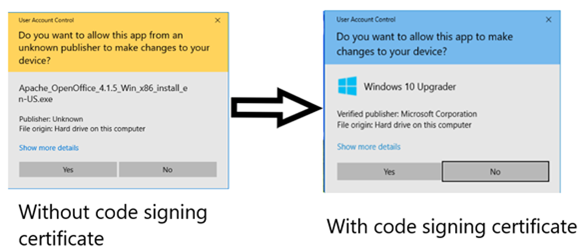
When downloading a software, the last thing you want to see is a warning message. If you get a warning messaging when attempting to download/install/run a software or app, then that most likely means that the developer is not using a code signing certificate.  A code signing certificate creates a “digital shrink wrap” over the software.

This certificate tamper-proofs the software code, which preserves the integrity of the content. In addition, this certificate also verifies the identity of the owner, so that the end-user can confirm that they are downloading software from the intended source and not an imposter hacker.

This image shows software without a digital certificate and software with a digital certificate:

Digital certificate - code signing

Get a Code Signing Certificate for $79/year!

Assert Publisher Identity, Ensure Software Integrity and Avoid Browser and Antivirus Warnings.

Shop Now

S/MIME Certificates

Secure/Multipurpose Internet Mail Extensions (S/MIME) certificates, aka personal authentication certificates, are primarily used to digitally sign and encrypt emails. What this does is two things:

  1. Ensure the email recipient can verify the identity of the email sender through a digital signature.
  2. Provide end-to-end encryption to ensure the contents of the sent email cannot be tampered with.

This means that the email sender can have peace of mind that the contents of the email they sent are secure and cannot be deciphered by a hacker AND the email recipient has peace of mind because they can verify that the sender is who they say they are (and not a hacker attempting a phishing attack).

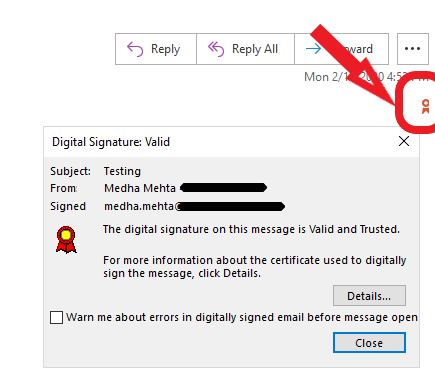
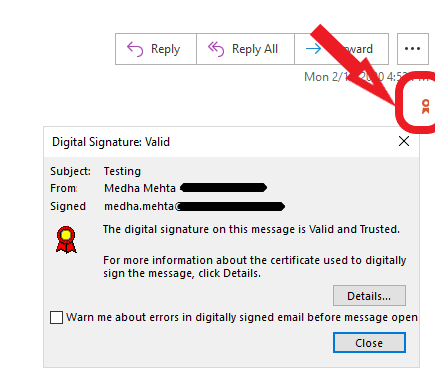
This is what an email signed with a digital certificate looks like:

Digital certificate - email

Get a Sectigo email signing certificate for only $12.95/year!

Save 20% on Secure Email Certificates! Get the lowest prices on trusted email certificates from Sectigo.

Shop Now

Document Signing Certificates

As the name states, a document signing certificate is for a document – they allow you to digitally sign and securely send documents. This is not to be confused with an e-signature. An e-signature is nothing more than a typed name. They do not secure or truly prove anything.

 A digital signature with a document signing certificate can be verified because the person who is signing and sending the document is using a private key that is exclusively owned by them to sign the document. In addition to this, the recipient will be notified if a hacker tampered with the document – this also goes a long way in upholding the integrity of the document.

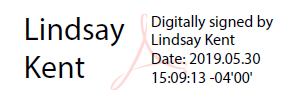
This is what a PDF document signed with a digital certificate looks like:

Digital certificate - document

Final Word

As you see, digital certificates can indeed provide that extra measure of security we need to be able to enjoy all the convenient and exciting things the internet provides. 

If you’re looking to enhance the online security of your website/business, and think digital certificates could be the answer – we highly recommend taking a look at SectigoStore.com. With every type of digital certificate you read about here, the best prices on the market and 24/7 customer support to guide you through your web security journey, you are sure to accomplish whatever digital security goals you have!

What is a Software Publisher Certificate?

Software publisher certificates are a game-changer for developers and publishers alike

In the ever-evolving digital world we live in, it’s crucial we take every measure possible to ensure we are operating with the highest security protocols and practices. This is no different when downloading, installing and running software. With so much personal information stored digitally, it is easy to see why users would decline to engage with a software if it rose any red flags. This is where software publisher certificates come in.

Software Publisher Certificate – The Quick Answer

A software publisher certificate (aka a code signing certificate) is a digital certificate that creates a digital shrink wrap over a software, app or device driver. This certificate will tamper proof your code, authenticate your identity and reduce warning messages.

3 Things a Software Publisher Certificate Does

1) Verifies Your Identity

Customer trust should be at the top of any software developer or publisher’s list of most important things. As we mentioned, if a user doesn’t trust your software – you aren’t going to get a download from that user. What may be even worse is if a user is looking for your software and comes across an imposter who is actually a hacker looking to use your brand to commit cybercrimes. Your brand reputation could take a major hit. 

Software publisher certificates combat this by giving user the ability to verify your identity. When you sign your code with your encrypted digital signature and private key, this gives users the ability to confirm they are downloading it from the intended publisher. This gives both you and the customer peace of mind.

2) Tamper-Proofs Your Code

It’s great that users will be able to verify your identity, but once your software is online – what is stopping a hacker for altering the code? The software publisher certificate got that one covered too. The certificate and private key are used to encrypt a hash of the software file. This ensures that the code is protected once its published.

This also protects users and your brand by ensuring that a malicious 3rd party does not tamper with the code.

3) Reduces Warning Messages

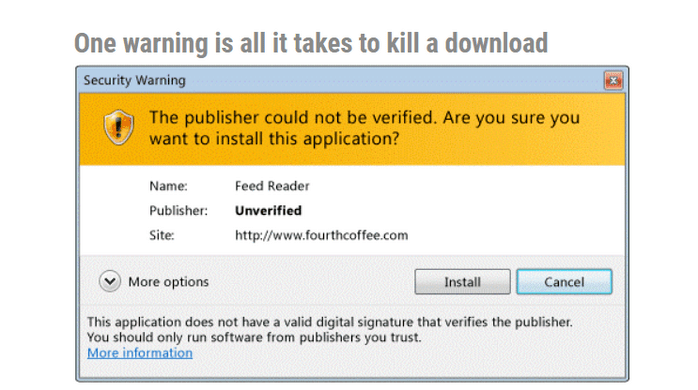
At the start of the blog we mentioned red flags, there may be no greater (and more annoying) red flag for software developers and publishers than warning messages. It’s surely a headache waiting to happen when your software triggers unexpected warning messages. Luckily, software publisher certificates can help ensure your software is trusted, removing the warning message.

Software publisher certificate warning

It is important to note that not all types of software publisher certificates will completely rid your software of being attached to every type of warning message (more on that in a bit).

Software Publisher Certificate Validation Types

There are generally three types of software publishing certificates you’ll come across (often referred to as code signing certificates). These are:

  • Individual Validation (IV) – Used by individual developers who are looking to publish their software under their personal name.
  • Organization Validation (OV) – Used by organizations (such as software publishing or development companies) who want to publish their software and sign code under their organization’s name.
  • Extended Validation (EV) – Similar to OV as it’s for organizations, but it is a higher level of validation, which means that you will need to go through a stricter validation process. While a more expensive cert, EV certificates come with some great advantages…

Get a Code Signing Certificate for $79/year!

Assert Publisher Identity, Ensure Software Integrity and Avoid Browser and Antivirus Warnings.

Shop Now

The Advantages of an EV Software Publisher Certificate

EV (extended validation) software publisher certificates are generally more expensive than OV and IV certs, and you must go through a stricter authentication process, but they come with some great benefits.

  • More Security – Your certificate and encryption keys are sent via a physical USB device. This offers more security because you literally have your private key with you and code can only be signed by your certificate with that specific USB device.
  • Trusted by Microsoft’s SmartScreen Reputation Filter – As we mentioned earlier, not all software publisher certificates are created equally. While an IV and OV will get rid of many warning messages, they will not be instantly trusted by the ever-pesky Microsoft SmartScreen Reputation Filter. However, an EV certificate will gain trust instantly and remove all Microsoft SmartScreen warning messages.

Save 27% on Microsoft EV Code Signing!

Get a Sectigo EV Code Signing Certificate for as a little as $289.67 per year.

Shop Now

Final Word

Software publisher certificates are a great (and often-times necessary) addition to any developer or publisher’s toolkit. If you’re looking to purchase a software publisher certificate (known as code signing certificates as well), we have you covered right here on SectigoStore.com. With both OV and EV certificates, 24/7 customer support and excellent prices all from one of the most known and trusted CAs out there (Sectigo), you are sure to find the right software publisher certificate for you.

Top 5 Best Wildcard SSL Certificates of 2026

Looking at the top 5 best wildcard SSL certificates and the different benefits they each offer

Products Validation Warranty Save Lowest Price
PositiveSSL Wildcard (DV) DV $50,000 67% $78.32/yr Buy Now
PositiveSSL Multi-Domain Wildcard (DV) DV $50,000 50% $159.20/yr Buy Now
InstantSSL Premium Wildcard (OV) OV $250,000 87% $122.31/yr Buy Now
Sectigo OV Multi-Domain Wildcard SSL OV $1,000,000 59% $639.20/yr Buy Now
EnterpriseSSL Pro Wildcard OV $1,500,000 21% $1,143.12/yr Buy Now

If you are looking for the best wildcard certificate, you can buy it from www.sectigostore.com at a considerable discount of up to 87%. SectigoStore has in its store a wide selection of wildcards to choose from. You can select the best wildcard certificate that suits your requirements and is friendly to your pocket. Wildcard SSL certificates are an excellent option due to their ability to secure an infinite number of subdomains and your main domain under one single certificate – this offers immense convenience and long-term affordability. However, not all wildcard SSL certs are created equal. There are slight differences and benefits depending on the CA, brand, type and validation level.

That is why we complied this list – to give you the top 5 best wildcard SSL certificates of 2026 and explain how they can help you in their own unique ways.

Best Wildcard SSL Certificate for Affordability – PositiveSSL Wildcard (DV)

The reason the PositiveSSL Wildcard SSL certificate is on this list is largely due to one key word – affordability. At the price of $78.32 per year, this certificate is a steal. This classic wildcard cert will secure your main domain and an unlimited number of subdomains with 256-bit encryption and a 2048-bit key. Throw in a site seal, $50k warranty and the fact that this cert can be issued in just minutes, and this truly is a great deal.

Best Price: $78.32 per year

View PositiveSSL Wildcard Certificate
 

Best Wildcard SSL Certificate for Multiple Domains – PositiveSSL Multi-Domain Wildcard (DV)

The PositiveSSL Multi-Domain Wildcard SSL certificate is perfect for the web admin/business owner who is looking to build out multiple web properties/websites. This certificate secures 3 domains and an unlimited number of subdomains for the flat fee of $159.20 per year. In addition to this, you can add up to 1,997 more domains to the certificate and secure an unlimited number of subdomains for each new domain you add.

This benefits you in a few ways:

  • You can build out a heck of a lot of web properties and secure them with one SSL cert.
  • This gives you the convenience of being able to handle SSL lifecycle tasks (issuance, renewal, etc.) for all of your secured domains/subdomains.
  • You are saving money as securing all these subdomains individually will get very expensive very fast.

Best Price: $159.20 per year

View PositiveSSL Multi-Domain Wildcard Certificate


Best Wildcard SSL Certificate for Small Companies – InstantSSL Premium Wildcard (OV)

For the buyer looking for a higher level of validation, this is the one for you. There are no extended validation (EV) wildcards but lucky for us, there are organizational validation (OV) options. With an OV cert, this means that your main domain and your subdomains will feature an SSL cert that carries a higher level of trust and prestige. You will need to go through light business vetting to obtain this cert but after that, users will be able to verify your company details to ensure you are legit and the correct website they are looking for in your certificate details found by clicking on the padlock icon next to your URL.

This way, you get the wildcard functionalities AND a higher level of validation.

Best Price: $122.31 per year

View InstantSSL Wildcard Certificate

 

Best Wildcard SSL Certificate for Mid-Sized Companies – Sectigo OV Multi-Domain Wildcard SSL Certificate

The Sectigo OV Multi-Domain Wildcard SSL certificate is certainly a special certificate – maybe the most special on this list as it combines all the features of the certificates above.

  • You get the wildcard functionality (securing an unlimited number of subdomains).
  • You also get the multi-domain function with 3 domains and the ability to add up to 2,000 domains total (and their subdomains).
  • It’s OV, so you get a higher level of validation and trust from the users who visit your site.
  • And a $1,000,000 warranty!

This is truly a special certificate that can serve many purposes!

Best Price: $639.20 per year

View Sectigo Multi-Domain Wildcard Certificate

 

Best Wildcard SSL Certificate for Large Companies – EnterpriseSSL Pro Wildcard

For enterprises looking to manage enormous internal infrastructures and secure an unlimited number of subdomains, the EnterpriseSSL Pro Wildcard SSL certificate is the best option for you. Backed by $1.5M warranty, OV validation and 256-bit symmetric encryption, this is the type of SSL certificate that is sure to make an enterprise feel secure and confident in their web security! Not to mention, at  $1,143.12 per year this is an excellent price range for a certificate like this.

Don’t get caught trying to manage what will seem like an endless amount of expiration dates and renewals – rather secure your domain or IP address (and an unlimited number of subdomains) all with one single cert!

Best Price: $1,143.12 per year

View EnterpriseSSL Pro Wildcard Certificate

 

SectigoStore.com Is the Place for a Wide-Range of Trusted Wildcard SSL Certificates

Looking for the best wildcard SSL provider? When buying from SectigoStore.com, you will also receive 24/7 customer support and some of the best prices on the market in addition to access to the best wildcard SSL certificates of 2026.

SSL Certificate for Subdomain – How Do I Get One for My Website? What is HSTS and Why Should Your Organization Use It

What is The Best EV SSL Certificate Price?

Here is what you’re looking at when shopping for the best EV SSL certificate prices…

EV SSL certificates are surely a worthy consideration when deciding what SSL certificate validation level to purchase. They carry quite a few benefits – namely providing users the ability to verify your website and organizational details via the certificate details found in your web browser, higher warranties and recommendations from respected government bodies, such as ENISA. 

EV SSL Price: Certificate Example

However, with it being the highest level of validation and carrying the most prestige, it’s also the most expensive SSL cert validation level. When looking at the question “What is the best EV SSL certificate price?” It depends what you consider “best.” In this blog, we take you through a few options that will hopefully make you a much more informed shopper going forward.

Most Affordable EV SSL Certificate

There is a good chance you meant what is the most “affordable” EV SSL price when you asked “what is the best EV SSL certificate price?” You won’t find an EV SSL cert more affordable than the $60-$100 per year range, which is pretty good cause that comes to somewhere around $6 per month. You aren’t going to find any free options as well – as free SSL cert CAs don’t offer higher levels of validation such as EV.

Here at SectigoStore.com we have the PositiveSSL EV SSL Certificate available for $79.84 per year. When you factor in our 24/7 support and our longstanding, well cultivated relationship with a highly respected, premier CA like Sectigo, this is just about as good as it gets in terms of affordable yet quality EV SSL certificates.

PositiveSSL EV Certificates from $79.84/year!

Get the lowest prices on trusted SSL/TLS certificates from Sectigo brands.

Shop for Sectigo SSL Certificates

Multi-Domain EV SSL Certificate May Be The Best Option for You

Sometimes going right for the “most affordable” SSL certificate won’t be the most affordable for you down the line. A multi-domain EV SSL certificate offers the same great benefit of displaying your organizational details in the user’s browser and it also secures an additional 2 domains at no extra cost. You also can secure up to 250 domains total under one certificate.

So, if you’re planning to secure more than one domain with an EV SSL certificate, the PositiveSSL EV Multi-Domain SSL Certificate is the way to go. Not only can you secure 3 domains for the flat fee total of $144.86 (about $48 per domain), the real value comes in convenience. With an EV multi-domain SSL certificate you can secure up to 250 domains in one swoop. This means one issuance, one expiration date – everything can be handled at once! This is real convenience in addition to affordability.

But you’re also getting the best EV certificate cost – just $48 per domain, per year.

What is The Best EV SSL Certificate Price – Product Comparison

 PositiveSSL EV SSL CertificatePositiveSSL EV Multi-Domain SSL Certificate
Price$79.84/yr$144.86/yr
Highest Level of ValidationYesYes
Dynamic Site SealYesYes
Warranty$1,000,000$1,000,000
Domains Secured13
Shop NowShop Now

What Is an EV SSL Certificate?

Diving into “what is an EV SSL certificate?” to ensure you find the right extended validation SSL/TLS certificate option for your organization!

From a technical perspective, SSL/TLS certificates accomplish the same thing: they secure communication between a browser and server using an HTTPS connection. However, some SSL certificates, like extended validation (EV) SSL certificates, most commonly called EV SSL/TLS certificates, enable greater digital identity verification and additional features.

So, how do you choose the right EV SSL/TLS certificate for your organization? You must consider several factors, including:

  • Certificate functionalities,
  • Certificate validation types,
  • Warranties,
  • IT support, and
  • Which certificate authority (CA) to use (based on price, brand reputation, and other considerations).

Let’s look under the hood at what makes EV SSL/TLS certificate so useful and unique.

What Is an Extended Validation SSL Certificate? A Quick Breakdown

The short answer to “What is an EV SSL certificate?” is that it’s the highest validation level you can obtain for an SSL/TLS certificate. You will go through the most stringent validation process, but you will get a few key benefits:

  • You’ll have the most respected SSL/TLS certificate on the market
  • Your site users will be able to confirm your verified organization details in their browser
  • Your site users will be able to avoid fake/scam websites

Are There Other Validation Levels?

Extended validation isn’t the only type of validation; it’s just the most stringent.

The validation level reflects the amount of digital identity verification you must undergo to receive an SSL certificate. The most basic level of validation only checks your domain name, which means that even a hacker can complete the validation process. Higher levels of validation also check organizational details to keep hackers out. Validation level differences are noticeable through the SSL/TLS certificate details shown in the user’s browser (more on that in the next section).

Regardless of the type of SSL certificate your purchase and install, all SSL certificates offer the same robust encryption. This enables you to secure the communications between users’ browsers and your web server, which ensures the data/info in transit can’t be intercepted in transit. With an extened validation SSL/TLS certificate, you also will display your organization’s validated information up front in the browser.

We’ll discuss the other two validation levels more later in the article. In the meantime, let’s explore what’s involved in a CA’s extended validation process.

An Overview of the EV SSL Certificate Validation Process

The EV SSL certificate is the highest level of validation. The process of getting validated for an EV SSL cert includes: 

  • An enrollment form
  • Organization authentication
  • Operational existence
  • Physical address
  • Telephone verification
  • Domain authentication
  • Final verification call

Yes, it’s a pretty thorough process. So, you might be thinking, why bother getting an EV SSL certificate?

EV SSL Benefit #1: Display Your Verified Organization Details in the Browser

When you use an EV SSL/TLS certificate, savvy users and shoppers will be able to view your organizational details easily in their browser up front. The same can’t be said with other validation levels that either don’t display the same identity info up front or require you to dig to find digital identity verification in a certificate’s details.

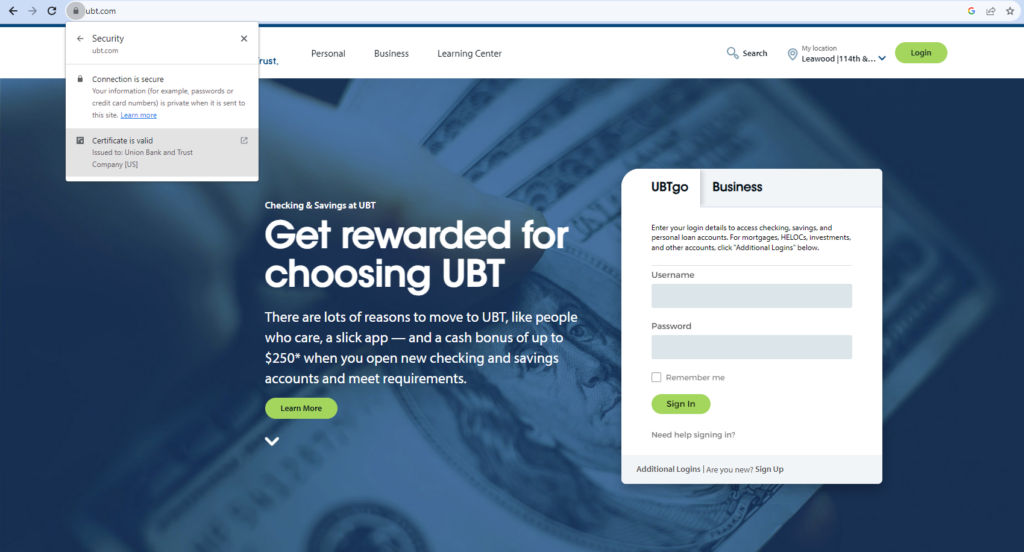
The EV certificate’s upfront display goes a long way in building trust with your customers as they can verify the organization’s identity much easier. All users need to do is click on the padlock icon in their browser’s address bar and they’ll see your verified organization name. For example, here’s what it looks like when you look at UBT.com’s EV SSL/TLS certificate information:

What is an EV SSL certificate graphic example 1: A screenshot of UBT.com that showcases extended validation SSL/TLS certificate information up front when you click on the icon in the browser's URL bar.
Image caption: A screenshot from UBT.com that shows the validated company information that displays up front when a website uses an EV SSL/TLS certificate.

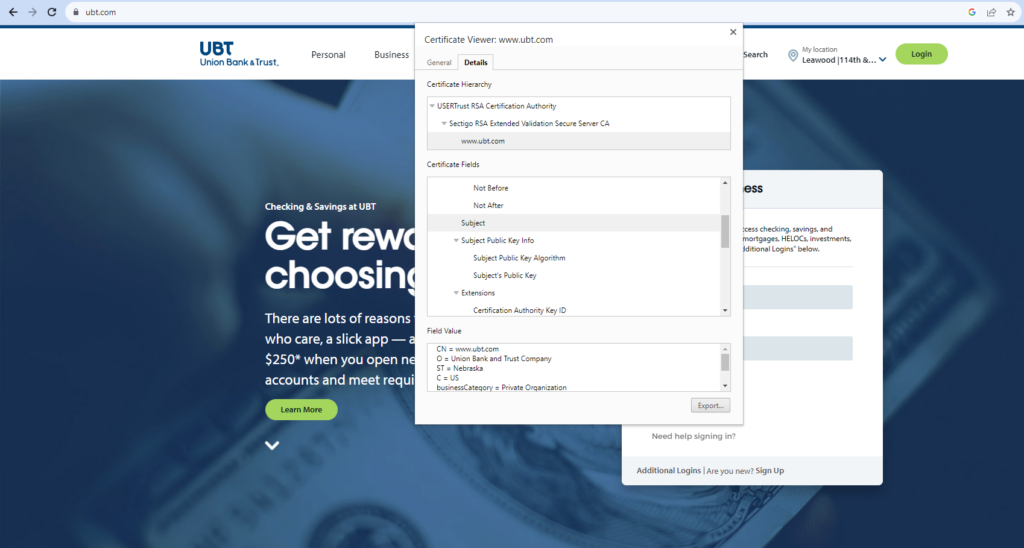
Looking for more details? After clicking the padlock icon, select Certificate is Secure > Certificate is Valid to view more information about the certificate’s Subject and Issuer.

What is an EV SSL certificate graphic example 1: A screenshot of UBT.com that shows the validated organization a website user can review by looking at the site's SSL/TLS certificate.
Image caption: A screenshot from UBT.com that shows the types of company-related information that’s included in an EV SSL/TLS certificate.

EV SSL Benefit #2: Higher Liability Protection

You’re also typically going to get a higher warranty with an extended validation SSL certificate. Take the warranty range here on SectigoStore.comEV SSL certificate warranties range from $1M-$2M while DV SSL certs range from $10k-$50k. SSL warranties are highly important as they allow you to maintain a level of accountability on the CA.

EV SSL Benefit #3: Maintain Compliance & Follow Recommended Best Practices

Here’s another great benefit: the European Union Agency for Network and Information Security (ENISA), which is the “centre of network and information security expertise for the EU, its member states, the private sector and Europe’s citizens” recommends the practice of using an EV SSL certificate on your website.

Ultimately, extended validation SSL certificates act as a higher symbol of trust for users and show a higher level of commitment to security by you.

PositiveSSL EV Certificates from $79.84/year!

Get the lowest prices on trusted SSL/TLS certificates from Sectigo brands.

Shop for Sectigo SSL Certificates

Who Should Use an EV SSL Certificate?

Extended validation SSL certificates are ideal for various applications with a higher level of identity assurance and trust. Websites frequently targeted for phishing attacks, such as well-known brands, banks, and financial institutions, can significantly benefit from using EV SSL certificates for their public-facing sites.

However, any website that handles sensitive data (such as login information) or processes online payments can benefit from the added security and verified brand identity that an EV SSL certificate provides. Extended validation SSL/TLS certificates are a great way to prioritize user protection and trustworthiness, making them appropriate for online platforms.

How EV SSL Certificates Strengthen Online Security and Trust

EV SSL certificates are a cornerstone of online security, safeguarding against cyber threats and fostering digital trust. By providing a multi-dimensional shield, they not only protect organizations but also elevate their online credibility.

1. Defends Against Cyber Threats

At the forefront of their function, EV SSL certificates stand as a barrier against phishing attacks. High-profile websites, including major brands, banks, and financial institutions, find enhanced protection. These certificates thwart impersonation attempts by visibly displaying verified identities.

2. Cultivates Digital Trust

Extended validation certificates instill confidence in users through the use of validated digital identity. Websites handling sensitive data and online payments, such as e-commerce platforms, gain a significant advantage when they prove they’re the real deal and not scam sites. By presenting a verified digital identity, organizations foster trust and assure users of their legitimacy.

3. Facilitates Compliance

EV certificates offer more than security for industries bound by stringent regulations, like healthcare and finance. They serve as a concrete manifestation of adherence to HIPAA, PCI DSS, and GDPR standards. This dual role ensures both protection and regulatory alignment.

4. Meets the Needs of Different Industries’ Applications

EV certificates transcend industries, serving diverse purposes. Government agencies and entities with public-facing services embrace these certificates to bolster trust. The certificates indicate a dedication to cybersecurity and confirm the legitimacy of services.

Industry-Related Use Cases:

  • Provides greater security for banking and financial institutions. In the financial realm, EV certificates fortify website and web app security for banks, credit unions, investment companies, and other financial institutions. This maintains customer trust and ensures the integrity of financial transactions in the digital realm.
  • Creates trust in healthcare services. Websites providing critical medical services and managing sensitive patient data leverage EV SSL certificates for trust and regulatory compliance. By doing so, they secure both patient information and user trust.
  • Provides corporate security. Large corporations offering a myriad of online services demonstrate their dedication to security by embracing EV certificates. These certificates validate their commitment to protecting user data and align security initiatives with corporate values.

EV SSL certificates reinforce online security and inspire unwavering user confidence by seamlessly weaving the above aspects together.

What Are the Other Validation Levels?

There are two other SSL certificate validation levels that you should know:

Domain Validation (DV) SSL certificates – This is the least stringent level of validation. Also, it’s the fastest issuance process (often taking just minutes). You only need to get your domain validated. The DV certificate is perfect for more simple websites, such as a blog.

Organization Validation (OV) SSL Certificates – This is generally regarded as the middle option. There aren’t as many steps in the validation process as an EV certificate, but more than one that’s domain validated. The process includes organization authentication, locality presence, telephone verification, domain verification and a final verification call.

Elevating Trust with a Sectigo EV SSL Certificate

Invest in a Sectigo extended validation (EV) SSL/TLS certificate to enhance your reputation and inspire client trust.

While priced at a premium, an EV SSL certificate delivers unmatched security. What sets it apart is the rigorous validation process conducted by the certificate authority (CA), ensuring user confidence through the padlock icon and prominently displaying your organization’s name within the browser.

Elevate client confidence and reinforce your commitment to security, leading to increased loyalty and amplified business opportunities. Strengthen your business data protection with the formidable security provided by a Sectigo EV SSL certificate.

SectigoStore.com Has Trusted EV SSL Certificates at Affordable Prices

So, we have answered “what is an EV SSL certificate?” If you’re looking for a wide range of EV SSL certificates from a trusted CA, look no further than SectigoStore.com.  From excellent prices to 24/7 support, this is the place for your EV SSL shopping!

Wildcard SSL vs Standard SSL: What’s The Difference?

Ensure you find the right SSL option for you by understanding wildcard SSL vs standard SSL…

In the world of SSL certificates, where there seems to be endless types, brands, validation levels, CAs and so on, it’s easy to feel lost or confused. But don’t worry, we got your back! We assume you’re here because you’re deciding between wildcard SSL vs standard SSL. These two SSL certificates help satisfy different needs. They both secure an HTTPS connection, but they don’t secure the same number of domains or type of domains. Here is what you need to know…

Wildcard SSL vs Standard SSL in a Nutshell

The quickest and to-the-point way of explaining standard SSL vs. wildcard SSL is:

Keep on reading for a more in depth look at a standard ssl certificate vs wildcard ssl certificate…

What Is a Standard SSL Certificate?

Standard SSL is better known as a single domain SSL certificate that offers the lowest level of validation. This particular type of SSL certificate secures your domain name (i.e. www.whateveryourdomainnameis.com or whateveryourdomainnameis.com). The single domain SSL certificate ensures that when a user communicates with www.whateveryourdomainnameis.com, the information/data traveling from their browser (client) to the website (web server) does not get intercepted by a hacker.

Standard SSL/TLS certificate
Image caption: An example of a standard SSL certificate (non-wildcard).

In addition, you receive the following benefits from an SSL certificate:

  • The coveted padlock icon in your URL
  • Eliminates unwelcoming messages such as “not secure” next to your URL
  • A small boost to your SEO
  • The appearance of a safer, more trustworthy and professional brand/website

The wildcard SSL certificate provides all the same things and more…

PositiveSSL EV Certificates from $79.84/year!

Get the lowest prices on trusted SSL/TLS certificates from Sectigo brands.

Shop for Sectigo SSL Certificates

What Is a Wildcard SSL Certificate?

As mentioned above, a wildcard SSL certificate provides your users with a secure connection to your website as well as the other benefits of having an SSL certificate. What makes it different is that you can secure an unlimited number of subdomains with a wildcard SSL certificate. During the issuance process, all you have to do is put an asterisk, such as *.whateveryourdomainnameis.com, in the Fully Qualified Domain Name (FQDN) field to signify you want all of your subdomains secured in addition to your domain name.

Wildcard SSL certificate example
Image caption: An example of a wildcard SSL certificate. Note the * at the beginning of the domain name. That’s how you can tell the difference between a wildcard SSL vs standard SSL.

This is what a subdomain looks like: subdomain.domainname.com. A subdomain basically acts as a mini website or subsection to your main website. Here are a few ways you can use a subdomain:

  • A blog site or login page
  • Sub-brand mini website, such as what Air Jordan is to Nike
  • Product sections (maybe you want each product to have its own look and feel without feeling out of place)
  • A media gallery or portfolio for photos or videos

Secure Unlimited Subdomains With One Wildcard SSL Certificate – Save 50%

Save 50% on Sectigo Wildcard SSL Certificates. Includes unlimited server licenses, reissuances, 256-bit encryption, and more.

Shop for Wildcard SSL Certificates

Wildcard SSL vs. Standard SSL: A Quick Technical Overview

Now that we have a grasp of the basics, let’s take a few moments to quickly compare some of the similarities and differences between standard and wildcard SSL certificates:

FeatureStandard SSL CertificatesWildcard SSL Certificates
Encryption StrengthOffers 256-bit encryption strength.Provides 256-bit encryption strength.
CoverageA standard SSL certificate covers non-WWW and WWW versions of a single domain.A wildcard SSL certificate covers non-WWW and WWW versions of a single domain and unlimited first-level subdomains.
Additional CoverageStandard SSL certificates provide a basic level of authentication without thorough company evaluation.A wildcard SSL certificate is ideal for securing a server and unlimited subdomains, suitable for SMEs, eCommerce websites, and large enterprises.
Who or What This Best ServesIdeal for bloggers and small websites that don’t have subdomains to secure and don’t collect sensitive customer information.Companies that need to secure multiple subdomains
Available Validation LevelA standard SSL certificate supports domain validation (DV). However, there are other single-domain SSL certificates that provide organization validation (OV), and extended validation (EV).It supports DV and OV validation.
WarrantyA wildcard certificate warranty offers assurance to a brand in the event of an SSL certificate failure on the CA’s end. Warranties for standard SSL certificates range upwards of $500,000.A wildcard certificate warranty protects a brand in the event that the SSL certificate the CA issued fails. Warranties for wildcard certificates range upwards of $1.5 million.
Encryption Protocols & AlgorithmsIt uses the SHA-2 algorithm, delivering up to 256-bit encryption and a 2048-bit RSA signature code.It uses the SHA-2 algorithm, delivering up to 256-bit encryption and a 2048-bit RSA signature code.
Key LengthRSA 2048-bit and ECC 256-bit keys.RSA 2048-bit and ECC 256-bit keys.
CostStandard SSL certificates have a lower cost (starting at approximately $8.78 per year).Wildcard SSL certificates are relatively more expensive (starting at approximately $78.32 per year) due to the additional coverage of unlimited subdomains.

A Closer Look at Wildcard SSL and Standard SSL Use Cases

Regular/Standard SSL Certificates

  • Single Domain Websites: Regular SSL certificates are tailored to safeguard websites operating on a single domain. These certificates deploy robust encryption mechanisms, ensuring secure and confidential communication between users and the website.
  • Blogs and Personal Websites: Individual bloggers and small websites with straightforward structures and no subdomains find regular SSL certificates to be an ideal fit. These certificates offer ample protection for their primary domain, fostering trust among visitors.
  • Small Informational Websites: For small business websites that mainly provide information and have a basic online presence, a standard SSL certificate suffices for securing their domain. However, if they collect customer data, it’s prudent to upgrade to an organization validation (OV) SSL/TLS certificate as a minimum. This is because getting one requires a more rigorous validation process, which can further instill customer trust in your brand.

If you have subdomains to secure, then you’ll want to consider switching to a wildcard SSL/TLS certificate instead.

Wildcard SSL Certificates

  • Multiple Subdomains: Wildcard SSL certificates cater to websites with multiple subdomains. Be it blog.example.com, shop.example.com, or mail.example.com, a wildcard certificate efficiently secures all subdomains under a single certificate. This helps to streamline your certificate management efforts and reduce certificate expiration-related risks.
  • Content Management Systems (CMS): Websites built on CMS platforms often employ subdomains for distinct functionalities like blogs or members’ areas. Wildcard SSL certificates simplify security by providing comprehensive protection for all subdomains under one certificate, warranting a seamless and secure user experience.
  • Large Enterprise Websites: Enterprises with extensive online infrastructure featuring numerous subdomains benefit from wildcard SSL certificates. Covering the main domain and all associated subdomains with a single certificate simplifies administration and reinforces security.
  • eCommerce Sites with Subdomains: Wildcard SSL certificates prove invaluable for online stores that utilize many subdomains for various sections, such as product categories or regional sites. They extend robust security across all first-level subdomains without requiring multiple certificates.
  • Web Hosting Companies: Web hosting providers offering wildcard SSL certificates enhance their service offerings. Customers can secure all hosted domains and subdomains with ease, strengthening security for their users and simplifying certificate management.

NOTE: For websites that collect sensitive personal data, you should use an organization validation (OV) certificate as a minimum. This validation requires your organization to undergo more stringent vetting before a publicly trusted CA will issue the certificate. This digital identity verification helps to provide greater peace of mind to customers because they’ll have greater confidence in your organization’s digital identity.

In summary, standard SSL/TLS certificates suit single-domain websites, while wildcard SSL certificates excel in securing websites with multiple subdomains on a single level. Evaluating a website’s structure and security requirements is vital in selecting the most appropriate SSL certificate for optimal protection.

Does Using a Wildcard SSL Certificate Have Any Drawbacks?

Are wildcard SSL certificates perfect? No. While wildcard SSL certificates offer numerous advantages, it’s essential to be aware of certain drawbacks when making your decision.

  • Shared Private Key: The use of a shared private key among subdomains poses a risk. If compromised, all subdomains could be vulnerable to security breaches.
  • No Extended Validation (EV) Option: By their very nature, wildcard certificates aren’t compatible with extended validation. This may be important for organizations requiring a higher level of validation and trust indicators.
  • Single Point of Failure: A wildcard SSL certificate covers all subdomains on a single level via a single certificate, streamlining management. However, this centralization also means if the certificate’s private key is compromised, then any connections to the potentially unlimited subdomains it’s used to secure will be compromised. (This is why it’s imperative to securely store and manage all of your PKI private keys.)
  • Certificate Installation Complexity: Managing certificates on multiple servers can be challenging, requiring careful handling of private keys and potential security risks during the installation process.

SectigoStore.com: A Trusted Source for Wildcard SSL Certificates: When purchasing your wildcard SSL certificate from SectigoStore.com, rest assured that you are choosing a reliable and reputable provider. SectigoStore.com is known for delivering top-notch security and unmatched customer support, ensuring your website’s protection.

Top-Tier Website Security Solutions: Sectigo Standard & Wildcard SSL Certificates

When comparing wildcard SSL vs standard SSL certificates, you’ll find that wildcard SSL certificates are priced slightly higher, starting at $78.32 per year. Now, compare this to standard SSL certificates, which start as low as $8.78 per year.

So, right from the jump (not including validation level or other considerations), you are looking at roughly a $70 difference. However, the investment pays off if you anticipate using multiple subdomains.

  • Having multiple single domain SSL certificates can get confusing as you have to go through the issuance process every time you need a new cert and not to mention, they will have different expiration dates.
  • With a wildcard SSL certificate, you can go through the entire SSL lifecycle for your domain and all of your subdomains in one swoop.

Streamline the process of managing multiple single domain SSL certificates with different expiration dates with a wildcard SSL certificate.

At SectigoStore.com, we offer both wildcard SSL certificate and standard SSL certificate options, providing top-tier security at affordable prices. Trust in our highly respected and longstanding CA to safeguard your online presence with SSL certificates that deliver peace of mind.

Choose SectigoStore.com for exceptional SSL solutions tailored to meet your website’s security demands.

SSL Certificate for Subdomain – How Do I Get One for My Website?

Sectigo RSA Domain Validation Secure Server CA

Since you’re here, it’s likely that you’ve seen the term “Sectigo RSA Domain Validation Secure Server CA” before and want to know what that entails. You’ve probably seen this when you’ve looked at the certificate details in your browser — something like this:

Certificate Details

You also might have seen one of the following texts in front of “issued by” when you clicked on the website’s padlock sign to check its SSL certificate

  • Sectigo RSA Domain Validation Secure Server CA
  • Sectigo RSA Extended Validation Secure Server CA
  • Sectigo RSA Organization Validation Secure Server CA

In this article, we cover everything that you need to know about Sectigo RSA Domain Validation Secure Server CA.

Buy Sectigo RSA Domain Validation Secure Server CA for $8.95/year Only!

Get the lowest prices on trusted SSL certificates from Sectigo.

Shop Now

What is Sectigo RSA Domain Validation Secure Server CA?

Let’s breakdown the “Sectigo RSA Domain Validation Secure Server CA” into three individual pieces — i.e.,

“Sectigo,”

“RSA,” and

“Domain Validation”

— to understand each term’s meaning more clearly.

Sectigo

In October 2018, Comodo CA, a certificate authority, was acquired by Francisco Partners. They have since rebranded Comodo CA as Sectigo. This means that all the Comodo CA digital certificates, including its sub-brands — EssentialSSL, PositiveSSL, InstantSSL, and EnterpriseSSL — are sold by Sectigo now. Comodo CA is the market leader in the cyber security industry for more than two decades. Now, the same legacy is carried forward by Sectigo. 

If you click on the padlock sign in your web address bar, you can see that the certificate signing authority is now listed as Sectigo. This is true for all SSL/TLS certificates that were previously issued under the Comodo CA brand.

Sectigo RSA Domain Validated Secure Server

RSA

RSA is a hashing algorithm. If the SSL certificate has mentioned “RSA,” it means it has used the RSA algorithm to encrypt its signature keys. The 2040-bit RSA key size is widely used in all the SSL certificates.

There is now a newer, lighter, and faster type of algorithm named elliptic curve cryptography (ECC). When you generate the certificate signing request (CSR) code, you’ll be given the option to use ECC if your SSL certificate supports ECC.

Most of the SSL certificates available on SectigoStore.com support the latest ECC algorithm. Make sure you check the product description to confirm whether it supports ECC.

sectigo ssl certificate

Domain Validation

This part indicates that the website is using a domain validation (DV) SSL certificate.

SSL certificates can be classified into three main categories as per their validation level:

  • domain validation,
  • organization validation (OV), and
  • extended validation (EV).

Domain validation is the easiest, quickest, and least expensive verification method. Here, the certificate authority verifies the domain ownership of the applicant before issuing an SSL certificate to a website. If the site is using Sectigo’s DV SSL certificate, you will see the following text in front of “issued by” row: Sectigo RSA Domain Validated Secure Server CA.

Organization validation (OV) and extended validation (EV) are high-end SSL certificates made for business organizations and eCommerce sites.

You would see one of the following details in front of the “Issued by” field in the certificate information window if the website is using an OV or EV SSL certificate:

  • Sectigo RSA Extended Validation Secure Server CA
  • Sectigo RSA Organization Validation Secure Server CA

Where Can I Get a Sectigo RSA Certificate?

You can get Sectigo’s digital certificates directly from Sectigo or from a platinum partner like SectigoStore.com. Please note that if you buy a Sectigo certificate from the partner’s website, you can avail the benefits of massive discounts. For example, we provide the PositiveSSL domain validated certificate for only $8.78/year, which is almost 80% lower than its retail price.  

Get the Top-notch Brand Sectigo’s SSL certificate only for $8.95/year!

Save 80% on SSL Security Certificates! Get the lowest prices on trusted SSL certificates from Sectigo.

Shop Now

SSL Certificate for IP Address

SSL Certificate for IP Address

Can an SSL Certificate Be Issued For an IP Address?  

The answer is ‘Yes.’ An SSL certificate can be issued for a public IP address. 

These are the rules and requirements to get an SSL certificate for an IP address: 

  • SSL can be issued for a public IP address.  
  • Your organization must control that particular IP address. 
  • A certificate authority must be able to verify your control of the IP address through file authentication (you’ll need to upload a specified file to be accessible via HTTP/HTTPS).
  • You must control the entire IP address, not just a specified port. 
  • You can put an IP address in the Common Name (CN) or a Subject Alternative Name (SAN) field (if you have chosen a multi-domain SSL). 
  • All versions of Windows will support the SSL if you specify the IP address as the Common Name (CN). Windows 8.1 and earlier versions will not support the SSL certificate if you specify an IP address as a Subject Alternative Name (SAN). 
 Common Name (CN) Subject Alternative Name (SAN) 
Windows 8.1 and earlier  Yes No
Windows 10   Yes Yes
  • An SSL certificate can’t be issued for Reserved IP addresses (RFC 1918 and RFC 4193 range)/ private IP addresses (IPv4, IPv6), Intranet for Internal Server Name, local server name with a non-public domain name suffix. 
  • Extended Validated (EV) SSL are not permitted to be issued for an IP address.  

Can I Get an SSL for Private IP? 

No. Since 2016, the CA/Browser Forum made SSL certificates for private IP/reserved IP and local server name with a non-public domain name suffix invalid and asked certificate authorities to revoke any such SSL certificates. Because such reserved IP addresses and local server names (intranet) are not unique, they are easy to impersonate by attackers to commit man-in-the-middle attacks and get unauthorized access to the data. Hence, publicly trusted certificate authorities can no longer secure such IPs. You can get a self-signed SSL certificate for private IPs and intranet addresses, though. 

Get SSL for IP Address for $33.69/Year Only

Popular SSL Certificates for Public IP Addresses.  

Name Warranty Domain Coverage Price  
Instant SSL$50K Single Domain $33.69/yr. More Info 
InstantSSL Pro  $100K Single Domain $48.11/yr. More Info 
Sectigo OV SSL  $1MM Single Domain  $87.50/yr. More Info  
EnterpriseSSL Certificate  $1.5MM Single Domain $287.79/yr. More Info  
Sectigo OV SSL Multi-Domain/UCC $1MM Multiple Domains $149/yr. More Info 

Top PCI Approved Scanning Vendors Comparison

There’s a lot to know when it comes to securing payment card-related data. If you’re in the market for PCI approved scanning vendors and don’t know where to start, you’ve come to the right place.

The Payment Card Industry Data Security Standard, or PCI DSS, is a set of 12 requirements organized into six control objectives to provide security to cardholder data. PCI DSS was created to provide a consistent security standard on a global scale for all businesses who store, process, or transmit payment card related data.

Requirement 11 of PCI DSS deals with testing security systems and processes. It requires running internal and external network vulnerability scans at least once every quarter. One of the clauses under this specification is to perform external vulnerability scans by PCI approved scanning vendors, also referred to as Approved Scanning Vendors (ASVs).

The complete list of PCI scanning vendors can be found on the official website of the PCI Security Standards Council. These vendors offer external vulnerability scanning solutions that adhere to PCI requirements, and they are tested and approved by PCI SSC before they’re added to the list.

ASV Scan Cost

An ASV scan cost depends on the features of the product and the scanning vendor. An ASV scan HackerGuardian from Sectigo can cost as low as $79.66 per year. If you are looking for an extended scan, the HackerProof Trust Mark Vulnerability Scan will cost you $577.50 per year from www.sectigostore.com

A Comparison of Top PCI Approved Scanning Vendors

Let’s do a quick comparison among some of the prominent and affordable approved scanning vendors:

Sectigo Sectigo ServerScan Tenable TrustGuard McAFree
Product HackerGuardian HackerProof Trust Mark Vulnerability Scan ServerScan PCI Scanning Tenable.io PCI ASV Workbench Security Scanned McAfee Secure PCI Compliance Scanning
Unlimited, On-Demand Scanning Yes Yes Yes Unknown (Depends on the plan) Yes
Self-Assessment Questionnaire Yes Yes Yes Unknown Yes No
Automated Scan Frequency Options Daily, Weekly, Monthly, or Quarterly Daily, Weekly, Monthly, or Quarterly Daily, Weekly, Monthly, or Quarterly Quarterly Internal and External Vulnerability Scans Daily, Weekly, Monthly, or Quarterly Unknown
Support Phone, Email, and Chat Phone, Email, and Chat Phone and Email Phone and Email Phone and Email Phone and Email
Security Trust Seal No Yes Yes Unknown Yes Unknown
Price Per Year As low as $79.66 per year As low as $577.50 per year $188 (per IP address per year) Starts at $2,275 per year for Tenable.io licensing $148 per year for quarterly scans (up to $1,764 per year for daily) $150 (per IP annually)
Buy Now Buy Now

While it’s true that all of the PCI scanning vendors on the list provide solutions that adhere to PCI DSS basic requirements, that doesn’t mean that they’re equal. The checklist below highlights qualities that you should look for when selecting a reputable and reliable PCI approved scanning vendor.

  • Reliability and Accuracy. Are you spending too much time trying to resolve false positives? Is your scanner allowing vulnerabilities to go undetected? There is a fine line between the two scenarios, and a good ASV is continually tuning their scan engines to deliver accurate results. Make sure you choose a vendor that invests in their products and research to keep their scanning results as up to date as possible.
  • Customer Support. Having round the clock dedicated customer support with skilled and experienced staff to resolve any issues or questions around vulnerability scans could potentially save your business from losing clients, reputation, or money. Make sure your ASV is there for your business when it needs them.
  • Continually Meets Standards. Do not select ASV vendors listed in red since that indicates they have not met all the current qualification requirements and are in remediation status. Failure to remediate within a stipulated timeframe could strike them off the list of approved PCI scanning vendors. A competent ASV goes above and beyond the base PCI DSS specifications and offers additional security services and trainings.

Scan your servers at the best price with Hacker Guardian

Run regular PCI scans and stay PCI DSS compliant with the HackerProof Trust Mark Vulnerability Scan.

Shop for Hacker Guardian PCI Scan Control Center

Positive SSL certificate Vs. Essential SSL certificate

What is the difference between Positive SSL certificates and Essential SSL certificates?

If you have reached this article, we can assume that you have already decided to secure your website and are now doing market research on different web security products. We appreciate the efforts you are putting into market research. The web security industry is like an ocean. With vast varieties of brands and features, if you don’t conduct your market research properly, you might get lost! From this ocean, two of the most widely popular digital certificates are Positive SSL certificate and Essential SSL certificate.

Similarities between Positive SSL certificate and Essential SSL certificate

Both certificates are offered by Sectigo (previously known as Comodo CA) the world’s leading brand in the online security domain. For over two decades, Sectigo has been offering its innovative and cost-efficient security products and services to more than 50 million customers, accounting for 42.5% of market share globally.

Both Positive SSL and Essential SSL certificates are domain validated certificates that can be issued in minutes. They both offer:

  • up to 256 bit encryption strength
  • 30-day refund policy
  • unlimited server licenses
  • unlimited re-issuance
  • 99.9% browser support.

They secure both www and non-www version of the domain name — for example, xyz.com and www.xyz.com. You don’t need to buy another SSL certificate for securing both the version of your domain name with Positive SSL and Essential SSL certificate.

About PositiveSSL Certificates

  • Low cost. Sectigo (previously Comodo) started the Positive SSL certificate line with the mission of providing inexpensive digital certificates. Positive SSL certificates became very popular among individual website developers, freelancers, startups and small-scale businesses. Sectigo realized that generally, small businesses could not afford to hire highly qualified developers and security professionals, making them more susceptible to data breaches. So Sectigo stayed true to the mission of the Positive SSL line and offered affordable access to industry-standard encryption with Positive SSL certificate starting at only $8.78/year.
  • Solid warranty. In addition, Sectigo has recently increased the warranty amount from $10,000 to $50,000 for Positive SSL certificates just to make sure that small businesses do not face severe crises if any of their clients become a hacking victim in the unlikely event of encryption failure.

What Is Positive SSL Certificate

PositiveSSL is a subsidiary of Sectigo, a market leader in digital website security. Sectigo has been providing security solutions to businesses of all sizes for two decades. PositiveSSL provides an industry standard of up to 256 bit encryption algorithm for all its SSL certificates.

A positive SSL certificate is a range of affordable SSL certificates offered by the trusted certificate authority (CA) Sectigo (previously Comodo CA). Small businesses and start-ups that don’t want to spend much on website security can opt for a Positive SSL certificate to protect their data. Positive SSL certificates can secure your website for as little as $8.78/year and gives you a warranty of $50K in case of a mishap.

Is Positive SSL Worth It

Positive SSL certificates are a low-cost solution for website security. Positive SSL is an affordable option for small businesses that want to gain website visitors’ trust by authenticating their identity and securing the data transferred online. Positive SSL is a worth investment for start-ups and businesses.

About EssentialSSL Certificates

  • Trusted brand. The Essential SSL brand has been trusted for many years by well-established organizations, popular blogs and businesses.
  • Add-ons. Sectigo offers freebies with Essential SSL certificates from time to time. For example, for many years, Sectigo used to offer free PCI scanning, free daily website scanning, etc. with Essential SSL. It has stopped offering these perks right now but will soon come up with new and innovative freebies.
  • Moderate price. Essential SSL certificates start from $23.84/year. Why the price difference? Let us ask you one simple question. Why do people buy a Rolex, even though an ordinary watch is available for $5? After all, they both are just showing the time! Exactly! People pay for brand value. Choosing a SSL certificate with higher brand value is a great way to demonstrate your commitment to security to your customers.

Positive SSL Vs. Essential SSL – Two Popular Sectigo DV SSL Certificates

Sectigo SSL Sectigo PositiveSSL Certificate Sectigo EssentialSSL Certificate
Product Technical Features sectigo-positive-ssl-logo Sectigo Essential SSL
SSL Type 2048-Bit Standard SSL 2048-Bit Standard SSL
Encryption strength 256-Bit 256-Bit
Validation Type Domain Validated Domain Validated
SSL Type 2048-Bit Standard SSL 2048-Bit Standard SSL
Issuance Time Instant, within minutes Instant, within minutes
Display Indicator HTTPS with Padlock in URL HTTPS with Padlock in URL
Documents Required File/Email Based Validation File/Email Based Validation
OS Compatibility Latest versions of Windows, Apple MAC, Linux, etc. Latest versions of Windows, Apple MAC, Linux, etc.
Browser Compatibility 99.9% Web and Mobile 99.9% Web and Mobile
Mobile OS Support Android, iOS, Windows Mobile, Blackberry OS, etc. Android, iOS, Windows Mobile, Blackberry OS, etc.
Server license Unlimited Unlimited
SSL Reissuance Anytime till the SSL Expiration Anytime till the SSL Expiration
Site Seal Type Static Site Seal Static Site Seal
Site Seal Sectigo Site Seal Sectigo Secure Seal
Warranty $50,000 $10,000
Money Back Policy 30 Days 30 Days
Pricing
1 Year $12.95/year $29.80/year
5 Years $8.95/year $23.84/year
Buy Today Add to cart Add to cart

Code Signing Certificate Expired Issues

What happens to my software and digital signatures when my code signing certificate expires?  

If this question haunts you at night, you’re not alone! Most software developers and publishers face this dilemma at one point. 

You might be in the process of buying your first code signing certificate, or your current certificate might be expiring soon (or it has already expired). Whatever the scenario, you’ve landed on the right article. We have answers for all your questions regarding code signing certificate expiration issues and renewals. 

Timestamping: The Ultimate Shield to Avoid Code Signing Certificate Expiration Issues 

You can use the timestamping function to avoid issues that stem from code signing certificate expiriesThe software developer/publisher can add a timestamp (i.e., put a digital signature) on the code using their unique private key. The digital signature will stay valid forever — even after the certificate expires.  

A timestamp is proof that the software was signed by the verified publisher while the certificate was still valid, and that it has not been altered since it was signed. In other words, the publisher of the software is the same as it was at the time when the code was signed. 

So, even after the code signing certificate is expired, all the timestamped software will show the publisher’s name instead of “unknown” on the security dialogue box. Without a timestamp, the digital signature dies with the certificate expiration and the end user will receive an error message. 

Sectigo offers the timestamping function for free. It doesn’t have any restrictions on the number of software applications you can sign while your Sectigo code signing certificate is valid.  

Note: Timestamping doesn’t mean that you can get away with not renewing your code signing certificate. Your signature in the timestamped software will be safe forever, but you won’t be able to sign and hash any new software after code signing certificate’s expiry date.  

Code Signing Certificate Got Expired or Expiring Soon? Follow This Expert Code Signing Certificate Renewal Guide!  

Once a code signing certificate expires, the browsers and operating systems will start showing the security warnings when some tries to download the software. The warning dialogue box would be the same as it was before installing the code signing certificate. If you have timestamped your software, users will be still shown the security warning, but the publisher’s name will be displayed on the security popup.  

Code Signing Certificate Expired
Warning Window for the expired code signing certificates

It’s advisable to renew the code signing certificate before it expires to avoid a security lapse or certificate outage. You can renew a code signing certificate as early as 90 days before its expiry date. If you renew your code signing certificate early, you won’t lose any time remaining on your existing certificate. Sectigo will adjust the remaining time on the new certificate. Plus, the validation process becomes way quicker. 

To renew your SSL, simply follow this link and click on the “Renew Now” instead of ”Add to cart.” 

renew code signing certificate
  • Did you know? You can change your certificate authority (CA) anytime you want.  
  • You can upgrade to an EV code signing certificate from regular organization validation (OV)/individual validation (IV) only if you’re a business organization (not an individual developer).  
  • Some CAs charge higher rates for renewing code signing certificates than what they charge first-time buyers. Luckily for you, Sectigo has the same prices for new buyers and renewals alike.  
Shop for Sectigo Code Signing Certificates and Save 53%

Tips for Buying a Code Signing Certificate for the First Time 

If you’re buying code signing certificate for the first time and are researching validity and renewal issues, these tips will help: 

  1. The code signing certificate is for downloadable software, device drivers, applications, executable, and scripts.  
  2. The code signing certificate is valid for a minimum period of one year and a maximum period of three years.  
  3. Sectigo offers IV code signing certificates for individual developers, freelancers, and small companies-startups. 
  4. If you’re not sure whether you need a code signing certificate or an SSL certificate, please check out our other article on the Key Differences Between a Code Signing Certificate and an SSL Certificate
Shop for Cheap Code Signing Certificates and Save 53%

Compare Code Signing Certificate Types

Features Sectigo Code Signing Certificate Sectigo EV Code Signing Certificate
Certificate Authority Sectigo Sectigo
Certificate Type OV Code Signing EV Code Signing
Validation Type Organization Validation Extended Validation
Multiple year options Yes Yes
Encryption strength 256-Bit SHA-2 256-Bit SHA-2
Issuance Time 1 to 3 Business Days 1 to 5 Business Days
Immediate Reputation with Microsoft’s SmartScreen Filter No Yes
Two-factor Authentication No Yes
Microsoft Authenticode Signing Yes Yes
Android Apps Signing Yes Yes
Apple OS X Signing Yes Yes
Java Signing Yes Yes
Apple OS X Signing Yes Yes
Microsoft Office VBA Signing Yes Yes
Adobe Air Signing Yes Yes
Windows Vista x64 Kernel Mode Signing Yes Yes
Windows Phone Apps Signing Yes Yes
Qualcomm Brew App Signing Yes Yes
Microsoft Office Document Security Yes Yes
Free Re-issuance Yes Yes
Support Options Yes Yes
Refund Policy 30 Days 30 Days
Lowest Price From $79/year From $289.67/year
Buy Now View Product View Product

Personal Authentication Certificate: What Is a 2 Way SSL Certificate?

A quick guide on what a two way SSL certificate does and how you can use it for mutual authentication

An SSL/TLS certificate is used to secure the data transmission between a user’s browser and the website’s server. When most people talk about these certificates, they’re referring to server certificates, which are used to authenticate servers to clients. However, what if you need to perform client authentication, meaning that you want to authenticate the client to the browser? This is where two way SSL certificates (or “2 way SSL”) come in handy.

Why would I need to use this other type of certificate? Because when both of these types are certificates are used, it facilitates mutual authentication between both parties.

There is one very important thing to know: Unlike a standard SSL certificate, a two way SSL certificate is actually known as a personal authentication certificate (PAC).

But before we jump into exploring the meaning of both of these SSL types, you first must be familiar with how the HTTPS connection is made. So, let’s have a quick review:

How SSL Authentication Works (A Brief Overview)

  • The website owner buys an SSL certificate for their domain name(s) and sends an unsigned certificate with their public keys to the certificate authority (CA).
  • The CA verifies the identity and domain ownership of the applicant by following a validation process. After successful validation, the CA issues an SSL certificate for the domain, ties the server’s public key to the certificate and signs it with its own intermediate root certificate.
  • When a browser (client) tries to connect to a website, the SSL handshake process takes place.
  • Once the SSL handshake process is over, the browser generates a session key and encrypts it using the public key attached in the server’s SSL/TLS certificate.
  • The session key reaches to the server. The server decrypts it using the corresponding private key.
  • Now, this session key is used for encrypting and decrypting all the data transferred between a server and the browser. 

The reason we have highlighted the word “SSL handshake process” here is because in the one-way SSL and the 2 way SSL, only the type of certificate that’s used and the SSL handshake process itself differs. All the other steps remain the same.

Now that you know the basics, let’s proceed further to explore the meaning, working style, and usage of the one-way SSL and two way SSL authentication processes.

How One-Way SSL Authentication Works with a Traditional SSL/TLS Certificate

Let’s start with the SSL certificate you’re most familiar with. In all the communications, there are two endpoints involved, the browser and the website it’s connecting to (i.e., a client and server). In one-way SSL authentication, only the identity of one endpoint — the server — is verified. When you try to open a website, your browser authenticates the legitimacy of the website’s server by checking the site’s SSL certificate. One-way SSL certificates are also known as server authentication certificates.

Let’s understand how the SSL handshake process takes place in one-way SSL authentication:

  1. When a user attempts to connect to a website on their web browser, the browser tries to establish an HTTPS connection to the website’s server. It sends the supported cipher suites to the server in the ClientHello process.
  2. The server responds by sending its public certificate (i.e., the SSL/TLS certificate) to the browser.
  3. The browser checks whether the certificate is legitimate (i.e., not expired or revoked), supporting the latest algorithms, properly configured, etc.
  4. After that, the browser checks the validity of the CA’s signature from its pre-installed root store.
  5. If everything seems fine, the SSL handshake process completes, and the browser generates the session key.

As you read above in the entire SSL handshake process, only the server’s SSL certificate is verified. Basically, this process enables the browser to ensure that it’s connecting to the right website’s server, and that all of the data is routed to the intended site only via a secure connection.

Now, let’s move to the next type of authentication to understand how the 2 way SSL authentication process differs from one-way SSL.

How Two Way SSL Authentication Works with a Personal Authentication Certificate

In two way SSL, both the client and the server’s identities are verified during the SSL handshake process. That’s why they’re also known as mutual authentication SSL certificates. Now, let’s explore how the SSL handshake differs in the 2 way SSL handshake process:

  1. When a user tries to connect with a website on their web browser, the browser tries to establish an HTTPS connection to the website’s server. It sends the supported cipher suites to the server in the ClientHello process.
  2. The server responds by sending its public certificate i.e., the SSL/TLS certificate to the browser.
  3. The browser checks whether the certificate is legitimate i.e., not expired or revoked, supporting the latest algorithms, properly configured, etc. 
  4. After that, the browser checks the validity of the certificate authority’s signature from its pre-installed root store.
  5. Once it successfully verifies the server, the client (browser) itself sends its public certificate to the server.
  6. The server verifies the validity and the CA’s signature of the browser’s certificate.
  7. If everything seems fine, the SSL handshake process completes, and the browser generates the session key.

As you can see, in the two way SSL certificate, there are two additional steps involved in the SSL handshake process, which we have highlighted in the red color above.

2 way mutual SSL authentication requires the use of:

  • A private key,
  • A personal authentication certificate,
  • A CA’s root certificate, and
  • A CA’s intermediate certificate (though not necessarily required in all cases)

Once the client verifies the server’s identity, the server gets a chance to verify the client’s identity, too. Here, both parties have their own separate SSL certificates, which must be signed by the publicly trusted certificate authority.

Uses of a 2 Way SSL Certificate

Two way SSL certificate authentication is also known as mutual authentication. In a server certificate, the server’s identity is verified during the initial SSL handshake. Two way SSL certificate authentication is a method where a client’s identity is also verified during the initial SSL handshake. Therefore, the two way handshake involves the authentication of both client and server.

So now that you know how the SSL handshake process differs between one-way SSL and two way SSL, the next question would arise, why is a two-way certificate necessary? A two-way certificate is used by the websites to select which clients can interact with it securely.

For example, an organization’s intranet website typically exists for their employees to access information and communicate on official matters. The organization doesn’t want anyone else to access such an internal website and would like to restrict the audience. Moreover, the employees should be accessing that website from their official devices only to further mitigate the risk of unsolicited access.

In such cases, the organization can use a two-way SSL certificate to authenticate the clients before letting them access the website. Companies also can use it to weed out the cybercriminals and bots from entering their sites.

Conclusion

2 way certificates are generally used in the organizations for the internal communication. For example, when you have an S/MIME or personal authentication certificate on all of your employees’ devices, no one can intercept and read the communication between the two endpoints. As far as SSL certificates are concerned, some organizations use it to block some particular user or website visitors from a particular geographical location. In either way, a two way SSL or any other 2 way certificates like S/MIME provide a robust security to your internal and external communications.  

Get Sectigo’s email signing certificate-which functions as a Personal Authentication Certificate, too.

Buy it today at a discounted price of $12.95/year and Save 20%!

Shop Now

What is Multi Domain Wildcard SSL and How Does It Work?

If you need to get an SSL/TLS certificate for more than one domain and multiple levels of subdomains, the multi-domain wildcard SSL certificate would be the perfect fit for your business. It takes away the hassles of managing multiple certificates for your entire portfolio of websites.

How a Multi Domain Wildcard SSL Certificate Differs from Other SSL Certificates

Still not quite sure how it all works? Let’s consider the following example:

Our friend Bob is a very successful businessman and has multiple websites for different lines of business with various subdomains. Ever since Google decided to flag HTTP websites as “not secure,” his business has seen a loss in customers because not all his websites have transitioned to HTTPS. He is extremely flummoxed with the whole situation of issuing, managing, and reissuing certificates and is looking for a simple solution to his problem.  

Bob already has the following domains and subdomains with the intention of adding more in the future:

  • www.site1.com
  • blog.site1.com
  • products.site1.com
  • order.site1.com
  • dev.blog.site1.co.uk
  • test.blog.site1.com
  • www.site2.org
  • dev.blog.site2.com
  • test.blog.site2.com
  • blog.site2.ca
  • products.site2.com
  • order.site2.com
  • www.site3.com
  • www.site4.net
  • www.site5.com

Instead of purchasing a single certificate for each, or one for each domain, Bob decides to use a multi domain wildcard SSL certificate. The certificate has subject alternative name (SAN) domain fields that he uses to lists the following as SANs

  • *.site1.com (secures blog.site1.com, products.site1.com, order.site1.com, etc.)
  • *.blog.site1.com (secures dev.blog.site1.com, test.blog.site1.com, etc.)
  • *.site2.com
  • *.blog.site2.com
  • *.site3.com
  • *.site4.net
  • *.site5.com

Unlike  a regular multi domain/SAN SSL certificate, you don’t need to redeploy the certificate each time you add a server to the list. For example, Bob can add blog.site3.com or tech.site3.com since it fits into the *.site3.com rule. Bob, however, didn’t add multiple levels to the rule, so if he needs to add dev.blog.site3.com or project.blog.site3.com, he would have to add that as a SAN. For a new domain, if it is in the same organization, there’s no need to go through the organization validation process again. However, the domain will be verified before it can be added to the certificate.

Features of a Multi Domain Wildcard SSL Certificate

Multi domain wildcard SSL certificates offer the same level of encryption as other SSL/TLS certificates. The difference between certificates varies in terms of their levels of validation and functionalities.

Listed below are the features of multi domain wildcard SSL certificates:

  • Include 256-bit strong encryption with 2048-bit RSA signature key.
  • Supports domain validation (issued within minutes) as well as organization validation (which typically takes one to three days)
  • One certificate that covers multiple domains and an unlimited number of multi-level subdomains
  • SAN wildcard support enabled
  • Includes a site seal
  • Enable HTTPS and the secure site padlock icon
  • Offer unlimited re-issuance
  • Supported by all major client browsers and mobile devices
  • Can be used on the same or multiple physical servers
  • Reduces complexity by simplifying the certificate management process for small and large-scale industries
  • Reduces the overall cost of enabling secure browsing across all the websites of the applicant’s business
  • Some CAs include additional benefits with their certificates such as vulnerability assessments and unlimited server licenses
  • Almost all CAs offer a warranty and refund policy for their multi domain wildcard SSL certificates

Key Considerations Before Purchasing a Multi Domain Wildcard SSL Certificate

Now that we understand what a multi-domain wildcard SSL has to offer let us look at some key points to keep in mind before we hit on add to cart.  

Common Name (CN) Domain

The certificate signing request (CSR) must have a non-wildcard entry as the common name. The wildcard version needs to be included as a SAN. For example,

  • Common Name: www.domain.com
  • SAN 1: *.domain.com
  • SAN 2: *.example.com
  • SAN 3:  *.dev.example.com

Domain Name Visibility

This certificate will list separate domains together. This means that all of your domains will be visible to site visitors. If you don’t want site visitors to see them for any reason, then this certificate is not a viable option.

WWW vs Non-WWW Domains

The certificate will not automatically secure the non- “WWW” versions of the wildcard domain entries.

Availability of Multi Domain Wildcard SSL Certificates

This product is offered by Comodo CA (powered by Sectigo).

Secure Up to 250 Multiple Domains with One Multi Domain Wildcard SSL – Save 50%

Save 50% on Sectigo Multi Domain Wildcard SSL Certificates. It includes unlimited server licenses, reissuances, 256-bit encryption, and more.

Shop for Multi Domain Wildcard SSL and Save 50%

Top Sectigo Multi-Domain Wildcard SSL Certificates of 2020

Features PositiveSSL Multi-Domain Wildcard (DV) Sectigo OV Multi-Domain Wildcard SSL Certificate Sectigo OV UCC Wildcard SSL Certificate
Lowest Price $159.20/yr $639.20/yr $639.20/yr
Domains Secured Main Domain + Sub Domains Main Domain + Sub Domains Main Domain + Sub Domains
Validation Level Domain Validation Organization Validation Organization Validation
SSL Encryption up to 256-bit up to 256-bit up to 256-bit
Key Length 2048 bits 2048 bits 2048 bits
Notification Level in Browsers Business name displayed on certificate details Business name displayed on certificate details Business name displayed on certificate details
Server License/td> Unlimited Unlimited Unlimited
SSL Site Seal Included Included Included
Reissue Policy Unlimited Unlimited Unlimited
Warranty $50,000 $1,000,000 $1,000,000
Refund Policy 30 Days 30 Days 30 Days
Wildcard Support Yes Yes Yes
SAN / UCC Support Yes Yes Yes
Browser Support 99% 99% 99%
OS Support [Desktop] Yes Yes Yes
OS Support [Mobile] Yes Yes Yes
Buy Now View Product View Product View Product

How to Install Email Certificate in Outlook

Email signing certificates (also known as S/MIME certificates) are used to digitally sign and encrypt the email messages that you send from your mailbox. Not only do these certificates ensure confidentiality but also determine the integrity of the messages. Only the intended recipient can decrypt and read the mail and ascertain that it hasn’t been tampered with by an attacker on the network.

Outlook Security Certificate

An outlook security certificate is a digital certificate used in Microsoft Outlook to sign the emails so that the receiver can be sure that the email has actually come from a legitimate person and has not been intercepted or altered by any other person. It uses the public key infrastructure (PKI) to encrypt and decrypt the communication. An outlook security certificate is also called S/MIME or email certificate. It’s a digital certificate used in Microsoft Outlook to sign the emails so that the receiver can be sure that the email has actually come from a legitimate person and has not been intercepted or altered by any other person.

Outlook 2010 Install Certificate

If you use Outlook 2010, installing an email certificate is very simple. This article is your comprehensive guide to install email certificates on Outlook. It also features screenshots to make it easier for you to install the certificate.

Secure Email Certificate Outlook 2016

A secure email certificate for Outlook 2016 helps you to fulfill three basic functions:

  • Validates the identity of the sender
  • Encrypts the email while in transit for confidentiality
  • Maintains the integrity of the email

Let’s see how to install a certificate for sending out an encrypted email in Outlook.

Prerequisites

1. Your email signing certificate

Download and save the PKCS#12 file (i.e., your email signing certificate) on your local machine and ensure that you remember the file path.

2. Your password

When saving your certificate file, you were asked to enter a password. Keep the password securely as it will be required during the installation process mentioned below.

Buy Sectigo Email certificate (S/MIME)– Save 20%

Save 20% on Sectigo Email certificate (S/MIME) Certificates. Ensure the best encryption to protect your communication through Sectigo Email Certificate.

Shop for Sectigo Email certificate (S/MIME) and Save 20%

How To Install Encryption Certificate In Outlook

Follow the simple steps mentioned below to install an encryption certificate in Outlook:

  • Go to ‘File’ then click on ‘Options’
  • Once the ‘Outlook Options’ window pops up, navigate to ‘Trust Center’ and select ‘Trust Center Settings.’
  • On the ‘Trust Center’ window navigate to the tab labeled ‘Email Security.’
  • On the right pane, under the Digital IDs (Certificates) tab, click on ‘Import/Export.’
  • On the ‘Import/Export Digital ID’ window that opens up select the ‘Import existing Digital ID from a file’ option.
  • Click on ‘Browse’ and navigate to the location on your PC where the file is stored and click on ‘Open.’ The file path should now be filled in the ‘Import File’ field.
  • Enter the password that you used when downloading file and then click ‘OK.’
  • On the dialogue box that pops up, click ‘OK.’
  • Under ‘Email Security’ select ‘Settings.’
  • Once the ‘Change Security Settings’ window pops up, enter the name for your security settings.
  • Under ‘Certificates and Algorithms’ next to the ‘Signing Certificate’ field click on ‘Choose’ to load your certificate and then click ‘OK’ on the confirm certificate window.
  • Repeat for the ‘Encryption Certificate’ field and if you have more than one, select the same certificate as you did for the previous step.
  • Click ‘OK’ and once the ‘Change Security Settings’ window closes, select the default options you want via the four checkboxes under the ‘Encrypted email’ tab.
  • Once you click ‘OK’ to close the ‘Trust Center Window’, your certificate is installed and ready to be used!

What Is a Secure Email Certificate? Here’s Your Ultimate Guide!

A secure email certificate, also known as an S/MIME certificate or an email signing certificate, is used by anyone who sends emails for business-related purposes that contain sensitive information. It’s widely used by small businesses, SMBs, and large corporations because it does two extraordinary things:

  1. It attaches a digital signature to the email that verifies that you (and not an imposter) sent the email, and that the email hasn’t been altered since it was sent.
  2. It encrypts your emails before they ever leave your mailbox so they can only be opened by your intended recipients. This provides both data in-transit and data at-rest protection.

Let’s understand each of the above-stated functions in detail.

A Digital Signature Warns Users Whether an Email Has Been Altered

When you install a secure email certificate on your email server (such as Microsoft Outlook, Apple Mail, Mozilla Thunderbird, etc.), it automatically attaches your digital signature to all of your outgoing emails. This digital signature is encrypted and produces a unique hash value. If anyone tries to alter this digital signature, the hash value changes. This warns the sender and recipient that something about the email is fishy.

Essentially, the encrypted digital signature assures the recipient that your email is valid, and it was sent by you/your company and is not a phishing email.

End-to-End Email Encryption: Protects Data in Transit and At Rest  

End-to-end email encryption means that your emails are protected from one end of the transaction to another. This means that before you even hit “send,” your email is encrypted. A secure email certificate encrypts the entire content of the email until the email reaches the intended recipient’s inbox and is decrypted. So, if anyone breaks into the email network, all they would see is a bunch of random numbers and letters, which won’t be of use to them! That’s because the actual message can be decrypted and read only by the intended recipient through the use of public key encryption.

In other words, a secure email certificate helps to ensure that your email contents arrive in the same condition as they were sent. Nothing is added, deleted, or altered while the email was in the transit.

If both the sender and recipient have installed a secure email certificate on their individual endpoints, all the signed emails stored and archived on the recipient’s email server also stay encrypted.

Get the top-notch brand Sectigo’s email signing certificate only for $12.95/year!

Save 20% on Secure Email Certificates! Get the lowest prices on trusted email certificates from Sectigo.

Shop Now

Why Email Encryption Matters

Okay, so encrypting your email and signing it with a digital signature sounds great. But what’s the real value to your organization? There are three crucial reasons as to why you should install a secure email certificate on your endpoint devices:

Protect Your Organization’s Reputation

It’s commonly said that you only get one chance to make a first impression. The same can frequently be said about an organization’s reputation. A data breach or other cybersecurity issue can result in costly reputational damage for your organization. And once you lose that trust — well, it’s hard to get it back.

It’s a common phishing practice to insert harmful scripts, links, and other sorts of dangerous malware into emails. When cybercriminals get access to any company’s email network, they use authentic emails sent by the authorize employees and corrupt them. The recipient thinks that the email was sent by a trusted organization. As a result, they open the email, click on the link, download the attachment, fill out the form, or share confidential details. That’s how they become the victim of various cybercrimes. 

On the other end, you —as the business organization — have no clue about it, and yet your reputation is getting harmed as a result.

Below is a screenshot of an email that’s been digitally signed by a secure email certificate. The small ribbon icon on the right site is a symbol of the encrypted email. When you click on that ribbon icon, you would see a window assuring the authenticity of the sender and the content of the email.  

secure email certificate.

Secure Sensitive and Confidential Information

Companies frequently send, receive, and store confidential information on emails. These details could be:

  • trade secrets,
  • customer lists,
  • stakeholders’ PII (personally identifiable information),
  • financial details,
  • conversation with customer care department, or
  • Information related pricing, discounts, costs, and profits, etc.

All of these details are virtual goldmines for hackers. They can use these types of information or sell them to your competitors, other cybercriminals, or even the media (if anything is controversial) and make tons of money from your misfortune.

But when you use a secure email certificate, you encrypt the contents and attachments of your emails, which allows you to protect them while they’re in transit or stored on email servers. Plus, a secure email certificate doesn’t cost you an arm and a leg! You can get it for as low rate as $12.95/year from SectigoStore.com!

Compliance with Regulations and Laws

Regulations such as the Payment Card Industry Data Security Standard (PCI DSS), Healthcare Insurance Portability and Accountability Act (HIPAA), and the European Union’s General Data Protection Regulation (GDPR) have outlined recommendations and/or requirements about securing sensitive information when sending it via email. 

How Does a Secure Email Certificate Work?

An email signing certificate works on public key infrastructure (PKI).

All the email addresses that use a secure email certificate have a set of asymmetric keys i.e. a public and it’s corresponding private key. As the name suggests, the public key is available to publicly, meaning that anyone can access it. The public key is used to encrypt the email’s contents.

The encrypted email travels via insecure internet and reaches to the recipient’s server.

Now, the role of the private key starts. The private key is safely stored on the email recipient’s server. When the content of the email is encrypted using a public key, only its corresponding private key can decrypt it.

secure email certificate.

The internet is likely always going to be insecure. Without encryption, anyone could potentially get access to your email messages and their contents. But when your emails are encrypted, no one can read or modify them until they reach the intended party.  

Sectigo Secure Email Certificate

There are many certificate authorities (CAs) in the market selling secure email certificate. Among them, Sectigo is the market leader in cybersecurity products such as SSL/TLS certificates, document signing certificates, and email signing certificates. Sectigo is just a newer brand name for the industry titan Sectigo (formerly Comodo CA). SectigoStore.com is the platinum partner of Sectigo. So, if you buy your Sectigo secure email certificate from us, you can get as much as a 20% discount on the retail price!

Is It Possible to Have One SSL Certificate for Multiple Domains?

The simple answer is a resounding Yes! You absolutely can use one SSL certificate for multiple domains — or one SSL certificate for multiple subdomains in addition to domains. To understand why and how you can do it , we need to take a look at SSL/TLS certificates and some of its various types.

Secure Sockets Layer (SSL)/Transport Layer Security (TLS) are cryptographic protocols that enable end to end encrypted communication between a client machine and a web server. When you decide to install an SSL/TLS certificate on your web server or access a site that uses one such certificate, the traffic is transmitted through an encrypted channel. What this implies is that if an attacker is eavesdropping on the network, he will not be able to steal your sensitive data in a readable form.

There are different types of SSL/TLS certificates classified based on their validation level and functionality. For securing multiple domains with a single SSL certificate we use either a multi domain/UCC/SAN certificate or a multi domain wildcard SSL certificate.

Two SSL Certificates for One Domain

It is possible to install two SSL certificates for one domain because of server name indication (SNI) technology. There are two possible scenarios to have two SSL certificates for one domain – if your old certificate is expiring soon or if you have one domain hosted on multiple servers and maybe using a load balancer. Although it is possible to have two SSL certificates for one domain, it is certainly not ideal for security and scalability.

How to Use One SSL Certificate for Securing My Domains with a Single SSL Certificate

So now that we have an idea about what an SSL certificate is let us understand how they come into play in securing our domains and how we can use one SSL for multiple domains.

How Multi Domain/SAN Certificates Work

Multi domain SSL/TLS certificates also called UCC (which stands for “unified communication certificate”) or SAN (which stands for “subject alternative name”) certificates, secure multiple fully qualified domain names (FQDNs). While the common name listed on the certificate signing request (CSR) cannot be modified, you can add or edit the SANs.

UCCs were created for certain server environments like Microsoft Exchange and Communications servers, but nowadays they can be used with any server environment. These certificates are available for all levels of validation — domain validation (DV), organization validation (OV), and extended validation (EV), but all domains will receive the same level of validation.

Consider the following example:

Alice is a business owner with multiple lines of business. She plans to build a different website for each of these businesses and wants to use HTTPS on all of them without having to manage multiple SSL/TLS certificates. Suppose she wants to secure the domains mentioned below:

  • www.site1.com
  • blog.site1.com
  • www.site2.org
  • www.site3.net

With a SAN certificate, she can secure all the sites by citing them as subject alternative names on a single certificate.

Secure Up to 250 Multiple Domains with One Multi Domain SSL – Save 50%

Save 50% on Sectigo Multi Domain SSL Certificates. It includes unlimited server licenses, reissuances, 256-bit encryption, and more.

Shop for Multi Domain SSL and Save 50%

How Multi Domain Wildcard SSL Certificates Work

A multi domain wildcard SSL certificate is a single certificate that covers multiple domains and their accompanying subdomains. It can be used as:

  • a SAN certificate (one SSL certificate for multiple domains),
  • a wildcard SSL ( one SSL certificate for multiple subdomains), or
  • a mix of both.

It can secure up to 250 domains and unlimited subdomains at multiple levels. While completing the CSR, an asterisk can be placed to indicate the level of the subdomain that needs to be encrypted. For example, if the website owner for site.com, example.com, and website.org are trying to secure first-level subdomains, the certificate application will appear as –

  • Common Name: www.site.com (Note: The common name can never be a wildcard)
  • SAN 1: site.com
  • SAN 2: *.site.com
  • SAN 3: *.example.com
  • SAN 4: *.website.org

Note that multi domain wildcard SSL certificates are available for two levels of validation: DV and OV.

Multi Domain/SAN/UCC vs. Multi Domain Wildcard SSL

The table below highlights the differences between multi domain (SAN) SSL certificates and multi domain wildcard SSL certificates.

Multi Domain/SAN SSL Multi Domain Wildcard Certificate
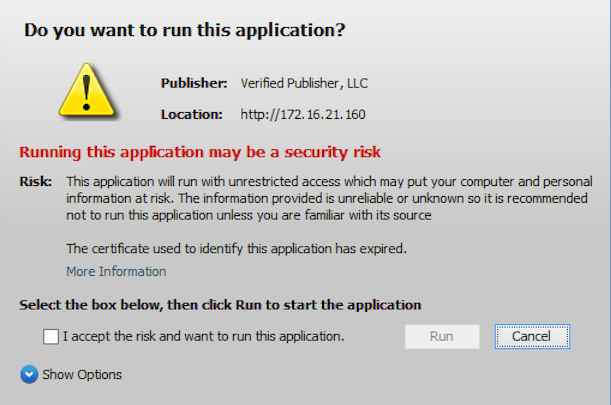
A single certificate that secures up to 250 domains and subdomains. A single certificate that secures up to 250 domains and an unlimited number of subdomains at multiple levels.
Limitations on the number of domains covered are defined by the issuing certificate authority. No limits on the number of subdomains covered. You can place an asterisk at the subdomain level you’re trying to encrypt in the SAN fields of the CSR.
Example: www.website.com, blog.website.com, www.website.org, www.example.com, etc. can all be secured using one certificate. Example: *.site.com secures every subdomain at that level such as order.site.com, blog.site.com, etc.
The different domain names you wish to secure must be defined and added at the time the certificate is purchased. Additional SANs can be acquired later. For modification of existing SANs, the certificate will need to be reissued. Additional subdomains can be added or removed at any time.
Available for all levels of validation – DV, OV, and EV. Available for DV and OV levels of validation. EV is not an option with wildcard SSL certificates.

In Summary

Depending on your specific business needs, you can use both a SAN certificate or a multi domain wildcard SSL to secure multiple domains. If there are numerous subdomains at different levels for the domains you want to cover, it makes more sense to go for the multi-domain wildcard SSL certificates. If, however, you can list them as SANs — and if it ends up being more cost effective for you — then that should be your pick.

Top Multi Domain SSL Certificates of 2020

Features PositiveSSL Multi-Domain (DV) Sectigo OV Multi-Domain SSL Certificate Sectigo Multi-Domain/UCC SSL Certificate
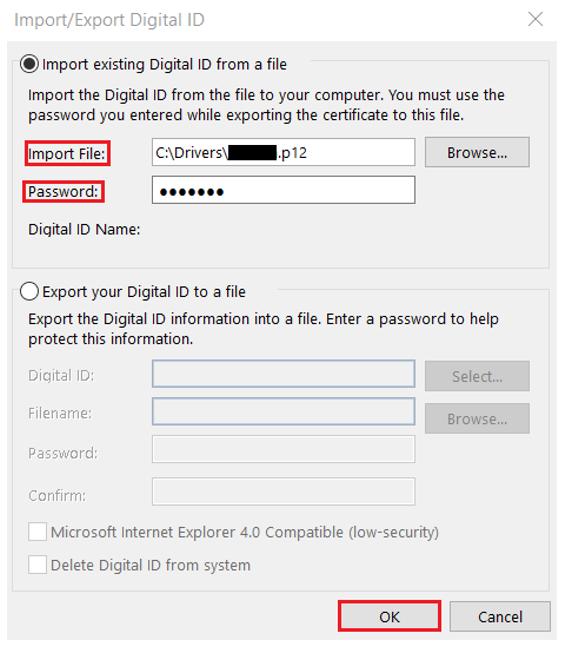
Lowest Price $25.60/yr $140.00/yr $127.20/yr
Domains Secured Up to 250 Multiple Domains Up to 250 Multiple Domains Up to 250 Multiple Domains
Validation Level Domain Validation Organization Validation Domain Validation
SSL Encryption up to 256-bit up to 256-bit up to 256-bit
Key Length 2048 bits 2048 bits 2048 bits
Server License/td> Unlimited Unlimited Unlimited
SSL Site Seal Included Included Included
Reissue Policy Unlimited Unlimited Unlimited
Warranty $50,000 $1,000,000 $500,000
Refund Policy 30 Days 30 Days 30 Days
SAN / UCC Support Yes Yes Yes
Browser Support 99% 99% 99%
OS Support [Desktop] Yes Yes Yes
OS Support [Mobile] Yes Yes Yes
Buy Now View Product View Product View Product